Automated Trading Systems: Build Your First Trading Bot
You look at the chart, see an opportunity, but hesitate and miss it. That is why there is automated trading – to avoid missing such moments because a trading bot will execute your trading strategy without any emotion. Such consistent execution works both ways. A bot will implement a great strategy without any hesitation. The same bot will repeat a bad strategy mercilessly. Either way, you will receive either profit or loss from it, depending on which one your strategy works. This guide explains how automated options trading works, where automation lives on Pocket Option, and how to build your first trading bot step by step.

What Automated Trading Systems Are
The idea of automated options trading means using a certain software which executes an order in case the conditions which you defined are fulfilled. You define the conditions, and the program tracks the market for fulfilling them.
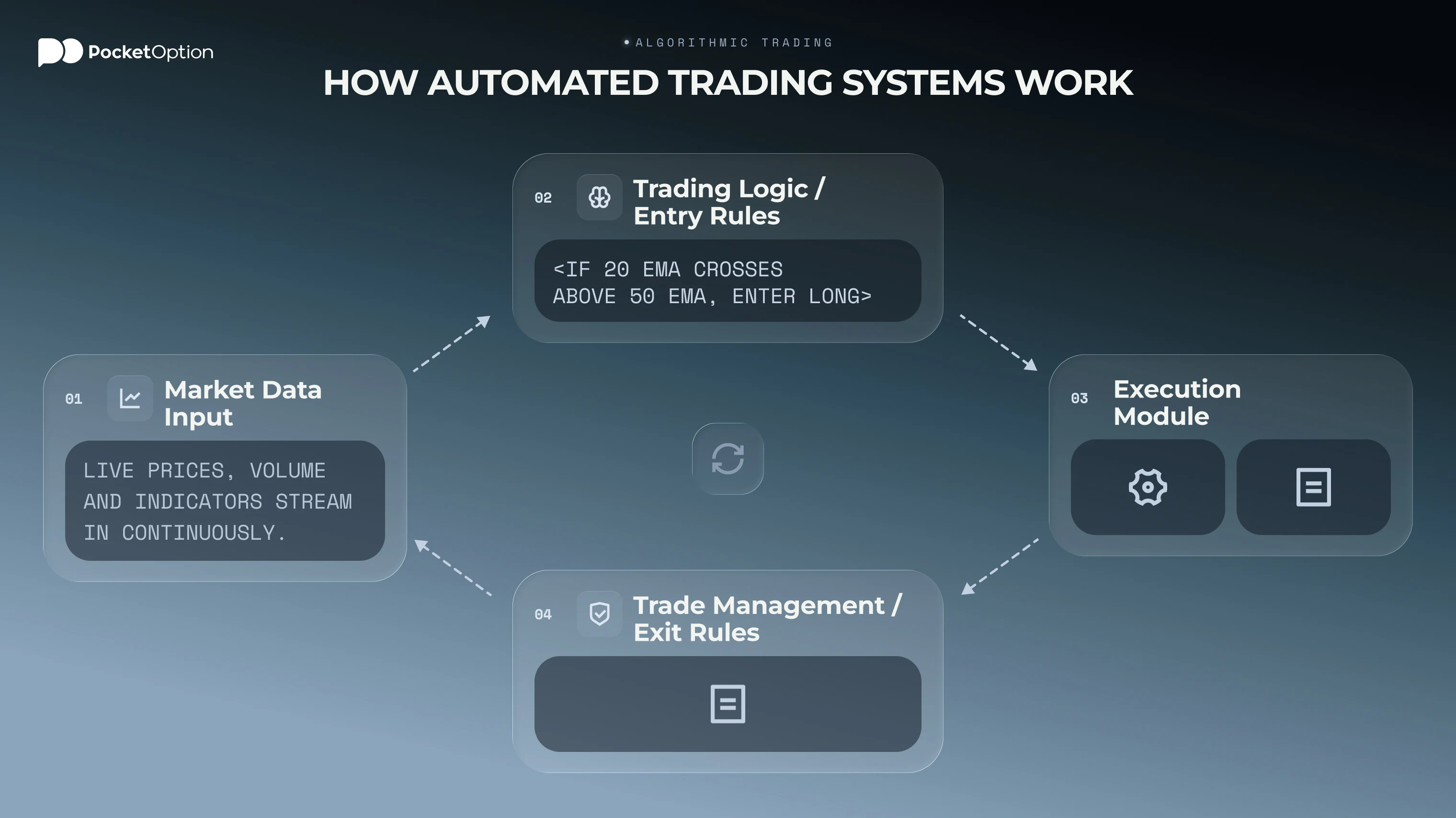
All systems of automation have the following structure:
Input data - the system receives the actual price and values of indicators;
Analysis - the program assesses the fulfilment of your conditions like the crossing of a fast-moving average over a slow-moving average;
Execution - in case the conditions are fulfilled, the position is opened according to your size;
Management - it closes the trade by your rules and saves the result.
The concept of "AI trading bot" is quite vague and can imply any script with an if-then statement or any systems created based on machine learning algorithms which work on new data. Trading AI implies the identification of patterns in large amounts of data, not the forecast of the future. The model may analyse more data than the human, but it still does not have any idea about the future of the market. No result is guaranteed anyway.
Why Traders Build Bots Instead of Clicking Manually
Algorithms have changed the dynamics of interaction between traders and markets, and three distinct benefits account for this fact.
Speed. An algorithm spots, recognises, and executes an order in fractions of a second. You can watch one chart; the bot monitors fifty.
Emotionless execution. The bot does not look for revenge after a loss, second-guess its entry, or panic in volatility. It executes the strategy, end of discussion.
24/7 operation. A bot operates when you work, rest, or climb mountains. It does not get tired in the sixth hour of a trading session.
On to the drawbacks of automation:
Automation cannot save a losing strategy. A flawed strategy, implemented with robotic speed, will be executed faster.
Market conditions may (will!) shift. Rules that worked well in a calm range might break in a news-induced trend. Loss-making is a part of trading, and bots also encounter losses.
There might be technological failures. Dropped connections, platform downtime, and mistakes in configurations are possible.
The "set and forget" approach is a myth. Every automated system requires constant attention from a human.
Consider automation as a tool that executes your strategy, but not a tool to replace a strategy altogether.
What a Beginner Trading Bot Actually Needs
When building your first trading bot, it’s easy to get overwhelmed by technical indicators and machine learning models. In reality, a reliable beginner bot doesn't need to be too complicated. It just needs three fundamental, non-negotiable rules.
A Clear Entry Rule
Your bot must know exactly when to open a trade. No ambiguity. Define exact triggers based on clean, preferably backtested data (such as, "buy when the 20-period Simple Moving Average crosses above the 50-period SMA”). If this condition isn't met by 100%, the bot stays on the sidelines, waiting for a better opportunity.
A Clear Exit Rule
Entering a trade is only half the job. Knowing when to exit is what locks in the profits. An effective exit rule specifies precise conditions for closing a position. For example, hitting a predefined target price, or profiting a certain amount of pips. You can set a trailing stop, or receive a reversal signal from some of your indicators.
Without a strict exit rule, even the best machine learning bot will hold positions indefinitely, and turn any winning trade into a drawdown.
A Fixed Risk Rule
Capital protection is what keeps a trading strategy working over time. A starter automated trading bot should never place trades with arbitrary position sizes. It should have proper risk management, just as a human trader. Risk no more than 1% to 2% of your total account balance on any single trade. Use automated stop-loss orders, or stop limit orders so that an unexpected market twist won't turn your profitable trades into losing ones.
How to Create a Trading Bot Step by Step
A trading bot is only as good as its trading strategy. Here are the 6 steps for building a trading bot from scratch – one step per component that each good algo must contain.
Step 1: Define your strategy. Understand what works and under which conditions long before jumping to code. Strategies for volatile markets are different from box range strategies. Different timeframes imply vastly different behaviors: a scalping bot using 1-minute timeframe is fundamentally different from a trading bot operating on the 4-hour or daily chart. Document your market, your timeframe, and the strategy.
Step 2: Identify the signal triggers. Write down the mechanical rules. Every good trading bot requires clear-cut and easy-to-understand conditions for entering and exiting the market. It's where beginners tend to get lost in complications. A good algorithm never uses a dozen indicators to build rules - less is more when it comes to conflicting signals. For example, "Enter position when 50-period MA crosses 200-period" is the rule which no machine can misunderstand. Put too many conditions - your signals will contradict one another and your bot will be paralyzed. Simplicity wins over complexity.
Step 3: Mind the execution. Perfectly clear signals are often distorted by the messy reality of live trading. Slippage and latency reduce efficiency of your bot, especially for short-term strategies. If your strategy relies on catching small price movements for 2-3 pips, even a second can make a big difference. MT5 strategy tester enables you to introduce the execution lag while backtesting. Use this feature for algorithms sensitive to latencies.
Step 4: Plan the risk management. This component is the least thought about, but it’s critical. Your bot should know when to enter and when to exit: the rules for stop-loss, take-profit or trailing stops should be programmed into the code. Position sizes should be managed just as well. A 1% risk of a $1,000 account is a lot different from a 1% risk of $10,000, and your bot should do the calculation, not you. Even if your bot is great at identifying the entry opportunities, it can fail due to insufficient risk rules.
Step 5: Test on historical data. Historical testing is the very essence of algo trading. Using Strategy Tester in MT5, you see how the backtest would perform given the months or years of historical prices. The testing shows both strengths and weaknesses of your algorithm, though it never guarantees future success. Do not fall into the pitfall of creating the perfect system: there is no such thing, since markets change and even the best systems experience drawdowns.
Step 6: Test on live account: start small and keep supervising. Begin with the minimal position size and read your logs every day. Compare live results with the backtests and figure out the reasons for discrepancies. Never trade more than you are ready to lose. Every step seems to put resistance to you? That's your risk management at work.
Create Trading Bot Logic Without Overcomplicating It
The ease of use for trading bots is undeniable. But remember: automation changes who clicks the button. But it does not change who is responsible. All of the decisions are ultimately made by you, just in the ‘setup’ phase. So logic should ideally be clear and sound, without overcomplications that would not let you tweak or adjust your bot.
Decision | Manual trading | Automated trading |
|---|---|---|
Strategy and rules | Done by you | You |
Position size | You, per trade | You, set in advance |
Trade timing | You, in the moment | The system, within your rules |
Risk limits | You, if you remember | You, coded in advance |
Turning it off | Always you | Always you |
An automated trade execution service such as a Pocket Option bot can take care of a few middle steps, and pull the trigger for you, when you define your conditions for a trade. But remember that in case of a drawdown in the account, the risk rules enabling it were also defined by you.
Popular types of algorithmic logic
The sky is the limit here, and there are constant innovations. But here are the four most common and stable groups of algorithms for you to start with:
Trend following: The algorithm follows the general price movement trend using various instruments like moving averages or momentum indicators and makes trades accordingly.
Arbitrage: The logic here detects discrepancies in prices of the same asset in different markets and uses them to make trades.
Sentiment analysis: Special software detects public sentiment regarding an asset based on its presence in news and social media and makes trades depending on changes in that sentiment.
High-frequency trading: HFT algorithms specialize in making very small profits but operate using huge volumes. It is a realm of institutions, not retail traders, who usually lack proper technical capabilities.
The most common strategy used by beginners is the trend-following one. The logic behind it is relatively simple and easy to automate.
How to Create an AI Trading Bot and What That Really Means
Creating an AI trading bot means building a program that uses machine learning algorithms (like neural networks, AI chatbots, or decision trees) to analyze historical data, detect complex patterns, and execute trades.
In practice, "AI" doesn't mean magic predictions, and it doesn’t implicitly trade better than a well-setup trading bot with internal logic. But if you choose to use statistical models, artificial intelligence is often a better approach.
If you are wondering how to create an AI trading bot, this typically involves three steps:
Data Collection & Feature Engineering. You start by gathering high-quality price charts, volume metrics, or sentiment analysis. This can often be bought, or downloaded from trading platforms directly.
Model Training. You need to teach an algorithm to see what is a good trade, and what is a bad one. Identify high-probability setups, do backtesting (it’s free in both MT5 and cTrader).
API Integration & Execution. Connect the trained model to a broker’s API so that it can automatically place orders; try to manage risk. Ideally, the trading should be done only on a demo account, for at least a few weeks.
Where Pocket Option Fits into Your First Bot Workflow
Pocket Option gives traders access to MetaTrader 5, and MT5 is where full automation happens. There are no limitations concerning the use of automated strategies since Pocket Option promotes bots positively and encourages their implementation as a legitimate tool.
Expert Advisor is the name of an automated trading strategy in MetaTrader 5: a program coded in MQL5 programming language analyzing the market and implementing the strategy according to the rules. For newcomers, three features provided by MT5 are especially useful:
MetaEditor, the development environment in which all the programs, including EAs, are developed and compiled;
Strategy Tester, the place in which all the testing of the strategies is carried out using historical prices;
A library with ready EAs and indicators as examples, useful for studies.
It is not necessary to know how to write code. You don’t need to be a professional programmer. Most of the traders prefer to modify existing algorithms at first, and later create their own. It’s easy now with the help of AI.
Signals and copy trading on the Pocket Option platform
All the mentioned kinds of automation are possible with coding. However, there are some features of the Pocket Option platform that help traders automate some processes to some extent:
Signals. Indicator-based alerts and analysis appear in the user interface. A signal is just information about an event. It does not give the orders for execution.
Copy trading. It allows mirroring other trader's positions in your trading account in the size you want. Copying makes the learning process shorter, yet you will also get losing streaks of another trader. No past results guarantee any future performance of any trader.
These could be considered as semi-automation, because they reduce the amount of work.
Requirements and precautions
To start automated trading on Pocket Option, several simple actions are required: opening an account, accessing MetaTrader 5, and having an idea about the strategy you want to implement. Nevertheless, several precautions should be taken into account:
Check the availability for your region. Not all services are available in all countries, and some terms may change from time to time. Make sure you can use the feature in your own account before creating anything based on it.
Protect your credentials. While looking for third-party EAs or services, do not give the access to your account password to anyone.
Be careful about EA providers’ promises. The bot market is full of the same: promises of effortless and enormous profit. Do not believe the performance promises before testing them yourself.
Practice before real trading. Start with testing the trading bot on a demo account for at least 20 days.
Risk-free on Pocket Option Demo account
Get Started with AI tradesConclusion
Designing and building a trading bot means learning much more than how to automatise processes. Writing down all the steps your robot will perform compels you to formulate the details of your trading strategy, rules on the maximum level of risks you accept, and your exit strategy. Such discipline comes in handy even if the bot does not go online.
Remember the hierarchy of trading elements when designing: strategy - risk rules - automation (the element responsible for carrying out the first two). Trading may boost your account size. Yet, it is equally capable of depleting it at an accelerated pace in comparison to manual trading.
How to start with bots? First, create a demo account. Practice there on virtual funds until you are convinced that your strategy/bot works. Only then you can use the rules you've developed and test them in a real environment.
Disclaimer: Trading involves significant risk of capital loss. This article is for educational purposes only and does not constitute financial advice. Always conduct independent research and consider your risk tolerance before making any trading decisions.
See more:InterestingTrading platforms