Pocket Option Live Trading: How to use it to its maximum benefit
Pocket Option live trading is basically where the training wheels come off, if that makes sense. Same charts. Same buttons. Except now the money's actually real, and so is whatever ends up happening if a trade goes wrong. This one's about what actually changes when demo turns into live, and how to not rush into that first trade too fast.
What Is Pocket Option Live Trading
Pocket Option live trading, when you get right down to it, means trading with money that actually belongs to you. Not some number a server just hands you for free (nice while it lasts, but it's not real). Real money, the actual kind. Prices are real, execution is real, and whatever ends up happening to a position happens to your balance too. Everything you already went through on demo carries over: reading a chart, putting in an order, picking how long the trade is going to run. None of that part changes.
What actually changes is the stakes, and that's a bigger deal than what it sounds like on paper. A losing trade on demo just kind of resets itself. Click a button, and boom, back to $50,000, no hard feelings about it. Simple as that. But a losing trade on a live account actually takes something away from you, for real this time, and that's pretty much the whole difference right there. It matters more than any indicator you'll ever learn, probably more than most people want to admit. People underestimate this anyway, every single time, even the ones who read warnings exactly like this one first (you'd think that would help more than it does).
Live Trading vs Demo Trading: Key Differences
A live account and a demo account pretty much look the same on the surface, if you're just glancing at them. Same layout, same charts, same buttons sitting in the same spots. But underneath all that, the differences are real, and most of them don't really kick in until actual money gets involved somehow. Here's the breakdown. Short version below.
Feature | Demo Account | Live Account |
|---|---|---|
Funds used | Virtual balance, resettable | Real deposited funds |
Profit or loss | Simulated only | Real money gained or lost |
Deposit bonuses | Not applicable | May be offered on qualifying deposits |
Copy Trading | Not available | Available |
Tournaments | Not available | Available, on a live account only |
Cashback | Not available | Available |
Withdrawals | Not applicable | Available, subject to verification |
Feature availability can change, and whatever's actually on offer for any given account shows up inside the platform itself anyway. So think of this table as more of a general guide than anything set in stone.
How to Create a Pocket Option Account
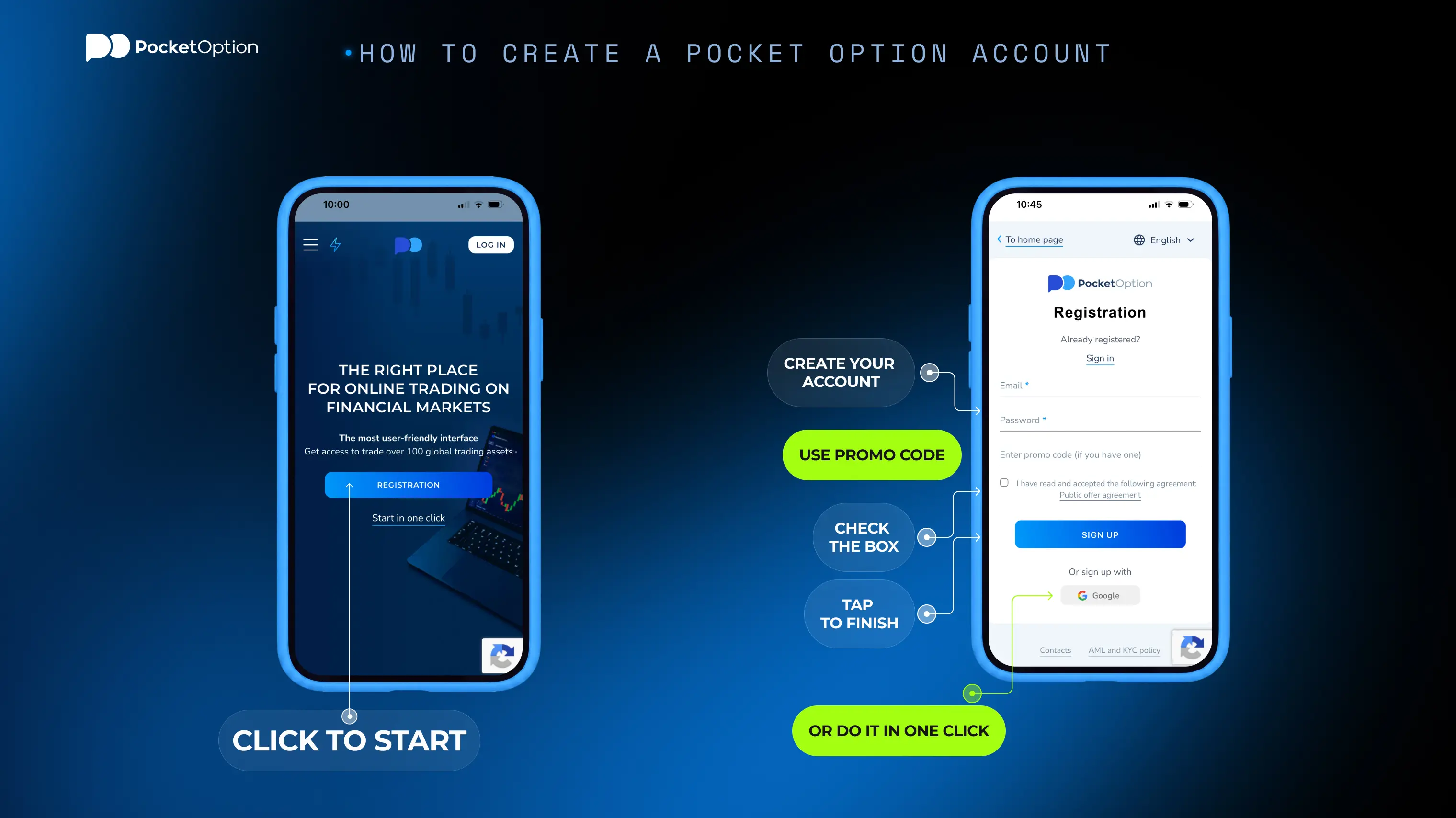
Opening an account doesn't really take that long, if we're being honest, quicker than setting up most streaming subscriptions if you want a comparison. Doesn't really matter whether the plan is sitting on demo for six months or jumping straight to live on day one, it's the same starting point either way. About five steps, give or take. Most people get through the whole thing before their coffee even has time to get cold. Not exactly hard.
Head over to the registration page and put in an email address, or use something like Google if that ends up being quicker.
Set up a password, then go ahead and confirm it through whatever link or code happens to show up.
Identity verification comes next, whenever it gets asked for. Put it off now and it will just be waiting for you later, right before that first withdrawal, which might be a pretty bad time to be digging around for a passport photo.
Go ahead and poke around the demo balance. Loads on its own. No deposit needed.
Once you are actually ready (and only once you are ready), switch over to the live account tab, make a deposit, and that's basically it. Real trading starts from there.
Moving from Demo to a Live Account
The jump from demo to an actual first Pocket Option live session is smaller, technically speaking, than it ends up feeling emotionally. The account switch itself only takes a few seconds, really. What actually needs preparing is the person doing the trading, not the software, and that part just takes longer. Sometimes a lot longer. Way longer.
A decent way to get started with Pocket Option live trading today, assuming demo is more or less all that has been tried up to this point, is to fund the account with an amount that genuinely would not hurt too much to lose completely, and then trade the smallest size the platform allows for a while.
This is not just some formality being added for no reason. Money changes the way people think about things, and it does it fast, way faster than most people expect going into it, which is kind of the whole point of easing in slowly instead of just diving in headfirst with a real bankroll on day one like it's demo money that just happens to have better graphics attached to it. A small first live session basically buys you room to notice that shift happening without having to pay full tuition for the lesson.
Plenty of people skip this part anyway. Fund heavy right away. End up learning the lesson the expensive way. Costs more that way. Always does.
How to Open Your First Live Trade Step by Step
The actual mechanics of placing a trade are identical whether it is Pocket Option trading live or on demo. Therefore, anyone who has already practiced has pretty much got this down already. What is actually worth double-checking the first time through is the handful of live-specific details below (the kind of thing that is easy to just skim past when there is real money sitting there waiting).
Live, not demo. Double check that toggle before touching anything else at all. Sounds obvious, sure, but it is still the single most common mistake first-timers end up making anyway.
Go ahead and pick an asset. Currency pairs, stocks, crypto, whatever ends up fitting the plan for that session.
Read the chart the same way you always would: trend lines, moving averages, candlesticks, whatever feels familiar at this point.
Set the trade amount on the smaller side. Live accounts let you go pretty tiny, which genuinely helps while you are still getting used to how real execution actually feels.
Pick the duration. Confirm the direction. Submit.
Your first trade is minutes away.
Start TradingReal-Time Market Analysis Tools on Pocket Option
Every single tool that is available on demo is still working for Pocket Option live session too. Arguably it can matter even more now, if you think about it, since there is actually something riding on the outcome this time. The charting side of things covers the usual types, candlesticks, line charts, and Heiken Ashi too if the regular noise needs smoothing out a bit. Drawing tools are there as well: trend lines, Fibonacci retracements, support and resistance markers, that sort of thing. There is also room for momentum indicators like RSI, plus MACD for anyone wanting to track trend strength instead of just plain direction. None of it stays complicated for long. Labels just sound scarier than they are.
There is also an analytics panel sitting right next to the chart, pulling in news and other broader data, so nobody actually has to tab out and go hunting around elsewhere for whatever is moving an asset before getting into Pocket Option live trading on it. Saves a whole browser full of open tabs. Small thing. Adds up more than expected.
Technical and Fundamental Analysis for Live Trading
Technical analysis basically reads price and volume history to make a guess about what is coming next. Fundamental analysis, on the other hand, reads the news and whatever is going on economically behind that price instead. Neither one really replaces the other, not completely anyway. Most experienced traders end up using both, rather than just picking one side and defending it forever, kind of like people do with a favorite sports team long after the stats stopped backing them up.
This overview of technical analysis on Pocket Option gets into how the indicators and chart types actually work together, and it is worth a look before applying any of it to something live. The fundamental side matters just as much though, maybe even more on a bad day: a technically clean setup can still get completely flattened if a scheduled economic release lands out of nowhere, and no amount of pattern recognition is going to prevent that from happening.
Best Times to Trade: Session Overlaps and 24/7 OTC Assets
Liquidity really is not the same all throughout the day, not even close sometimes. The overlap between London and NY tends to bring in the heaviest volume for currency pairs and the bigger indices. More volume usually just means tighter pricing and cleaner-looking charts, which means less of that jumpy, noisy price action that shows up during the quieter hours and looks kind of like a signal even though it really is not one. Worth watching for early on. It gets obvious fast enough on its own.
Outside of regular exchange hours, weekends included, OTC assets stay tradable pretty much nonstop, since their quotes get built to reflect market-like conditions without actually needing some exchange to be open somewhere. Good for an awkward time zone situation. Good for anyone who is into trading at like two in the morning too, for whatever reason (no judgment here, genuinely).
One thing worth mentioning here though: OTC pricing is not exactly the same thing as a live exchange feed. Treating the two as basically interchangeable is a mistake worth avoiding. Asian trading hours have their own rhythm as well, generally a bit quieter, sometimes choppier on certain pairs, worth knowing about even for someone who mostly trades other windows.
Is Live Trading on Pocket Option Profitable: Realistic Expectations
There is really no honest way to promise a specific return here, and anything that tries to should probably be read with some real suspicion. Profitability when it comes to Pocket Option live trading comes down to strategy, discipline, sizing, and market conditions, and it swings around pretty hard between different individual traders. Some manage to stay profitable for long stretches at a time. Plenty don't, especially early on, while habits are still forming and mistakes still cost something instead of just being old news by that point.
A better question than will I profit is probably more like how do I avoid losing more than I can actually afford while I figure that out. That one has real answers. Right below. The other question just sits there. Unanswered, no matter how it's asked.
Risk Management Practices for Live Trading
Risk management is not really one clever trick or anything like that. It is more just a handful of pretty boring habits done every single time without fail, the kind of thing that sounds obvious right up until the exact moment it actually matters. This day trading risk management piece gets into position sizing and stop placement in a lot more depth, but the essentials pretty much fit into a short list anyway.
Risk a small, fixed slice of the account on any one trade when doing Pocket Option trading live. Around 1% to 2% tends to get used a lot.
Decide on the amount and the exit point before actually entering the trade. Not while it is already open and emotions are already running the whole show.
Try not to size up to chase back a loss. Fastest way there is. Small loss, big loss, just like that.
Keep some kind of simple log of the trades taken, including why each one happened, so patterns actually start showing up over time instead of just staying some vague feeling nobody can really pin down.
Set a loss limit for the day or the week. Hit it, and just stop. Doesn't matter how good the next setup looks. Doesn't matter at all.
Test your risk plan first.
Try the DemoCan You Trade Full-Time on Pocket Option
Some people do end up treating this as full-time work, and the platform's round-the-clock access to assets makes that logistically doable, at least. This overview of full-time trading on Pocket Option gets into what that actually looks like on a day-to-day basis, OTC access included, for anyone trading outside the usual market hours or dealing with a time zone that just does not line up.
Logistics really are not the hard part though, when you think about it. Staying consistently profitable over a long stretch is the actual problem, and it is a much harder one than simply being available whenever, even at 3 a.m. if that is what it takes. Probably better to treat this whole thing as a slow transition, tested small first, rather than some decision made after one unusually good week. A cash buffer for the leaner stretches helps quite a bit too, since even a genuinely solid strategy still loses sometimes, and losing feels pretty different when trading happens to be the only income in the room. Worth tracking expenses too, the boring kind. Full-time trading is still a business. Even on days it doesn't feel like one.
Live-Only Features: Copy Trading, Cashback, Tournaments, Withdrawals
A handful of features only really switch on once an account has actual real funds sitting behind it. Copy trading during Pocket Option live session lets someone automatically mirror another trader's positions, at some set proportion. Copying someone else's trades still means someone else is the one actually making the decisions though, and that person can have a rough week just as easily as anybody else can. This guide on how copy trading works walks through the settings involved: proportional sizing, plus a stop balance that halts things once some chosen limit gets hit. Still worth saying again: this is automation, not some shortcut around risk. A copied strategy can lose money just as easily as one someone trades by hand. Sometimes even faster. The copier isn't the one watching the chart.
Tournaments run on a totally separate competition balance, so a bad tournament trade does not touch the main account at all, which is kind of a nice bit of insulation when you think about it. Cashback gives back a slice of losses on whatever qualifies. Withdrawals obviously need a live balance to begin with, since there is nothing real sitting inside a demo account to actually pull out in the first place. None of it shows up on demo. That's the whole point of the name.
Regulation and Licensing
Pocket Option gets run by Infinite Trade LLC, registered over in San José, Costa Rica, and holds a brokerage license issued under the International IBC Regulation Act 2014, authorized through the Mwali International Services Authority on the Autonomous Island of Mwali, in the Comoros Union. This breakdown of Pocket Option's regulatory status gets into the detail beyond just this summary version.
Licensing requirements really do vary a lot depending on the country, and this offshore setup is not exactly the same tier as some major regulator sitting in a big financial hub somewhere.
Worth saying plainly: traders should check whatever actually applies where they live, and treat any regulatory claim, whether it is from this platform or literally anywhere else, as something worth confirming independently, regardless of how official the paperwork happens to look once it is all stacked up together. Verification documents get asked for as part of that same overall framework too, the same identity checks mentioned earlier during account setup, and they exist specifically because of the licensing structure just described above.
Learning Resources for Live Traders
There is a whole Guides and Tutorials section that covers chart reading, order types, and common strategies, aimed at more or less whoever happens to be reading this right now. Also worth just keeping the demo account active even after going live, since it stays a genuinely cheap way to test some new idea before actually risking it for real.
General trading education outside the platform itself tends to hold up pretty well no matter where it originally got learned. Risk, psychology, how markets actually behave once things get tense, none of that is really platform-specific at all. Doesn't replace actual screen time, obviously. Does cut down the list of expensive lessons someone has to personally learn the hard way though, one at a time. Reading about a mistake is cheaper than making it. Almost always.
Common Mistakes New Live Traders Make
A pretty short list of mistakes ends up explaining most of the bad early results people run into. Mostly avoidable too, the moment someone actually knows to watch out for them. Nothing all that exotic here, if we are being honest. Just discipline, or the lack of it. Easy to spot in someone else. Harder in yourself. Read this list slowly.
Funding that first live account with more than actually feels comfortable to lose, then feeling every single little tick because of it afterward.
Sizing up on live past whatever actually got tested on demo, almost like the rules just quietly changed somewhere along the way.
Doubling up the next trade to chase a loss. Instead of just stepping back.
Skipping a written plan entirely, just going off impulse, or a hunch, or some feeling that this particular trade is somehow different.
Ignoring scheduled news. It can move a price hard and fast. Sometimes there is no time to react at all.
Treating a winning streak on demo as proof the same size is going to work identically live, when it usually just does not hold up quite the same.
Conclusion
Pocket Option live trading really is not some separate platform from the demo version, when you get down to it. Same charts, same buttons, just with real consequences bolted on top, that's pretty much the entire difference right there. Which is exactly why preparation actually matters so much: a sensible deposit size, a small starting position, an actual risk plan, and an honest habit of reviewing trades afterward. That combination beats any indicator setting. Every time. No contest, really. Fair enough to still get things wrong sometimes, everyone does eventually. Just keep it small when it happens.
Set up your account now.
Register NowDisclaimer: Trading involves significant risk of capital loss and may not be suitable for all investors. Past performance does not guarantee future results.
See more:Knowledge baseTrading