
How to use Copy Trading on Pocket Option
Copy Trading on Pocket Option automatically copies trades from successful traders, letting you learn and earn without trading independently. This section explains how it works and how to use it effectively.

How Does Copy Trading Work in Pocket Option
😎The Pocket Option trade copying mechanism is a feature that connects experienced traders with those who want to copy their trades. When an experienced trader opens a trade, the same trade is automatically duplicated in the account of the copying trader, adjusted for the size of his investment. To learn how to copy people on Pocket Option, it's helpful to understand the concept of a copy trading signal.
The system allows you to:
- Set maximum investment per trade
- Choose percentage of capital to allocate
- Select multiple traders to copy
- Monitor real-time performance
Key Copy Trading Parameters
To use the Copy Trading function effectively, several key parameters should be considered:
| Parameter | Description |
|---|---|
| Copy in Proportion | Determines the percentage of the original trade to be copied |
| Stop Balance | Sets the balance amount at which copying will stop |
| Min Copy Trade Amount | Defines the minimum size of copied trades |
| Max Copy Trade Amount | Sets the maximum limit for copied trades |
How to Start Copy Trading on Pocket Option
Steps to Activate Copy Trading
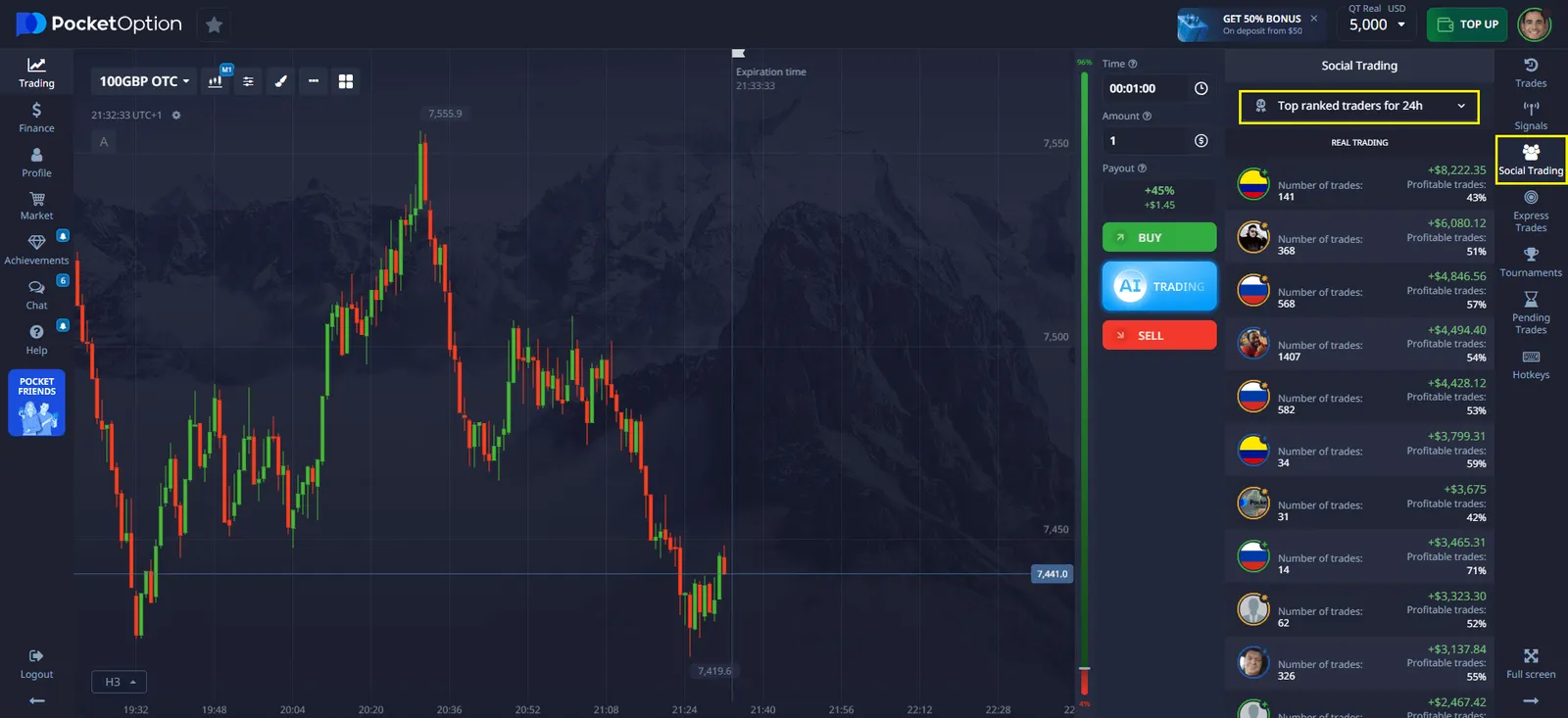
- Open the "Social Trading" section. Select the section in the platform menu where you can see traders available for copying.
- Choose a Trader. Review the list of top traders and analyze their statistics.
- Set Copying Parameters. Define the trade copy percentage and set minimum and maximum limits.
- Click "Copy". Once the settings are confirmed, the system will automatically start copying the selected trader’s trades.
How to Find the Right Trader?
Before copying trades, it’s important to select a trader with a successful strategy. On the right hand side of the platform's work screen, select the ‘social trading’ menu and you will see various menus. The platform menu offers the following categories:
- Top 100 Traders – the ranking updates in real time.
- Best Traders in the Last 24 Hours – shows the most recent results.
- Search by ID – allows finding a specific user by unique number.
- Top ranked traders - the most profitable trades, updated every minute.
Examples of Trade Copying with a 60% Proportional Copying Setting
Copy Trading Settings:
- Proportional Copying: 60% (only 60% of the original trade amount will be copied).
- Stop Balance: $70 (copying will stop when the balance reaches this amount).
- Minimum Copy Trade Amount: $6 (trades below this amount will not be copied).
- Maximum Copy Trade Amount: $75 (trades above this amount will not be copied).
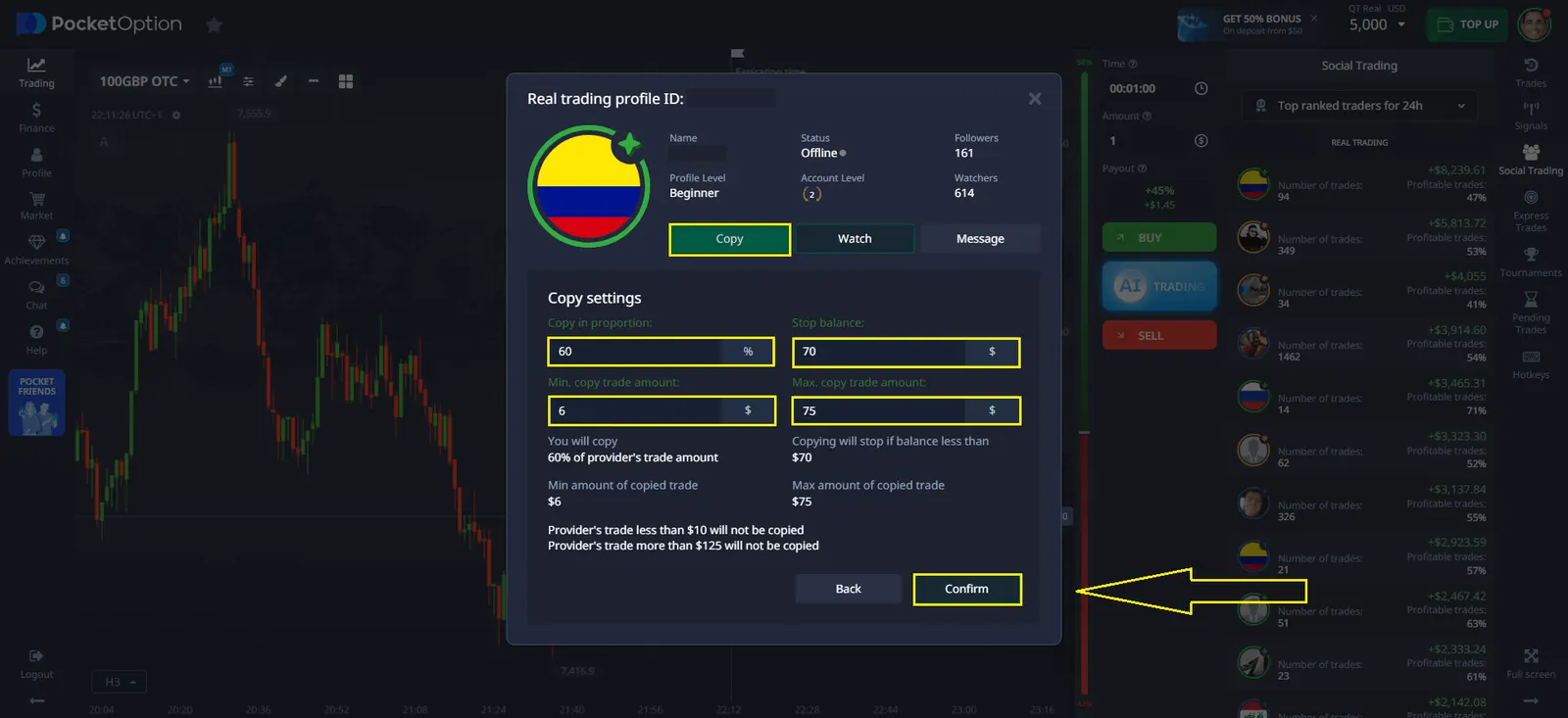
Example 1: Trading parameters have been successfully copied
- Original trade amount: $50
- Calculation: 60% of $50 = $30
- Verification:
- $30 is greater than the minimum copy trade amount ($6).
- $30 is less than the maximum copy trade amount ($75).
- Result: ✅ The trade will be copied.
Example 2: Trade is NOT Copied Due to Minimum Limit
- Original trade amount: $8
- Calculation: 60% of $8 = $4.80
- Verification:
- $4.80 is less than the minimum copy trade amount ($6).
- Since it is below the minimum threshold, the system will not process this trade.
- Result: ❌ The trade will NOT be copied.
Example 3: Trade is NOT Copied Due to Maximum Limit
- Original trade amount: $200
- Calculation: 60% of $200 = $120
- Verification:
- $120 is greater than the maximum copy trade amount ($75).
- Since it exceeds the set limit, the system will block the copying process.
- Result: ❌ The trade will NOT be copied.
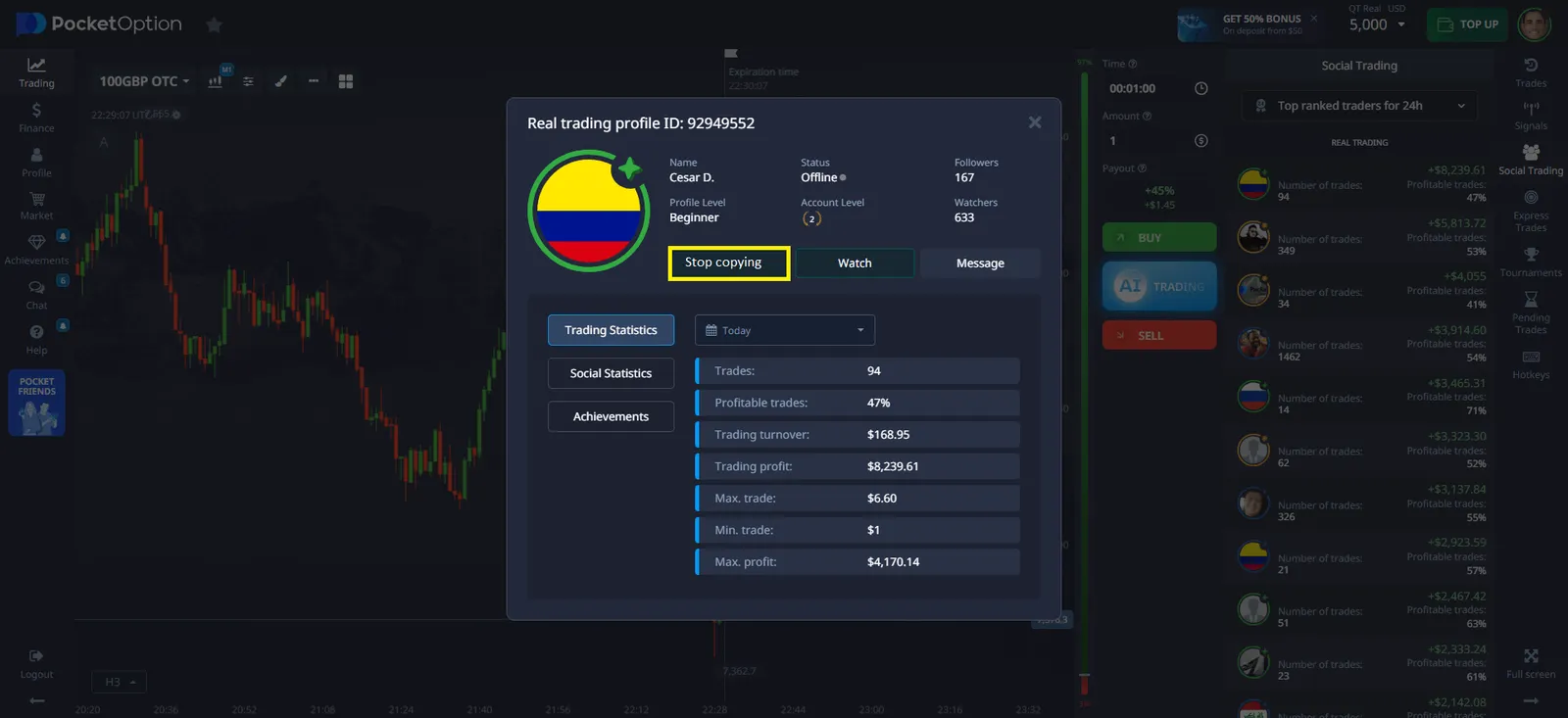
How to Stop Copying a Trader?
If you need to stop copying a trader, follow these steps:
- Go to the "List of Copied Traders" section.
- Select the trader you want to stop copying.
- Click "Stop Copying".
- Confirm the action.
Note: All active trades executed before cancellation will be completed as usual.
Social Trading Settings
Pocket Option offers flexible settings to tailor Copy Trading to your needs.
Available Options:
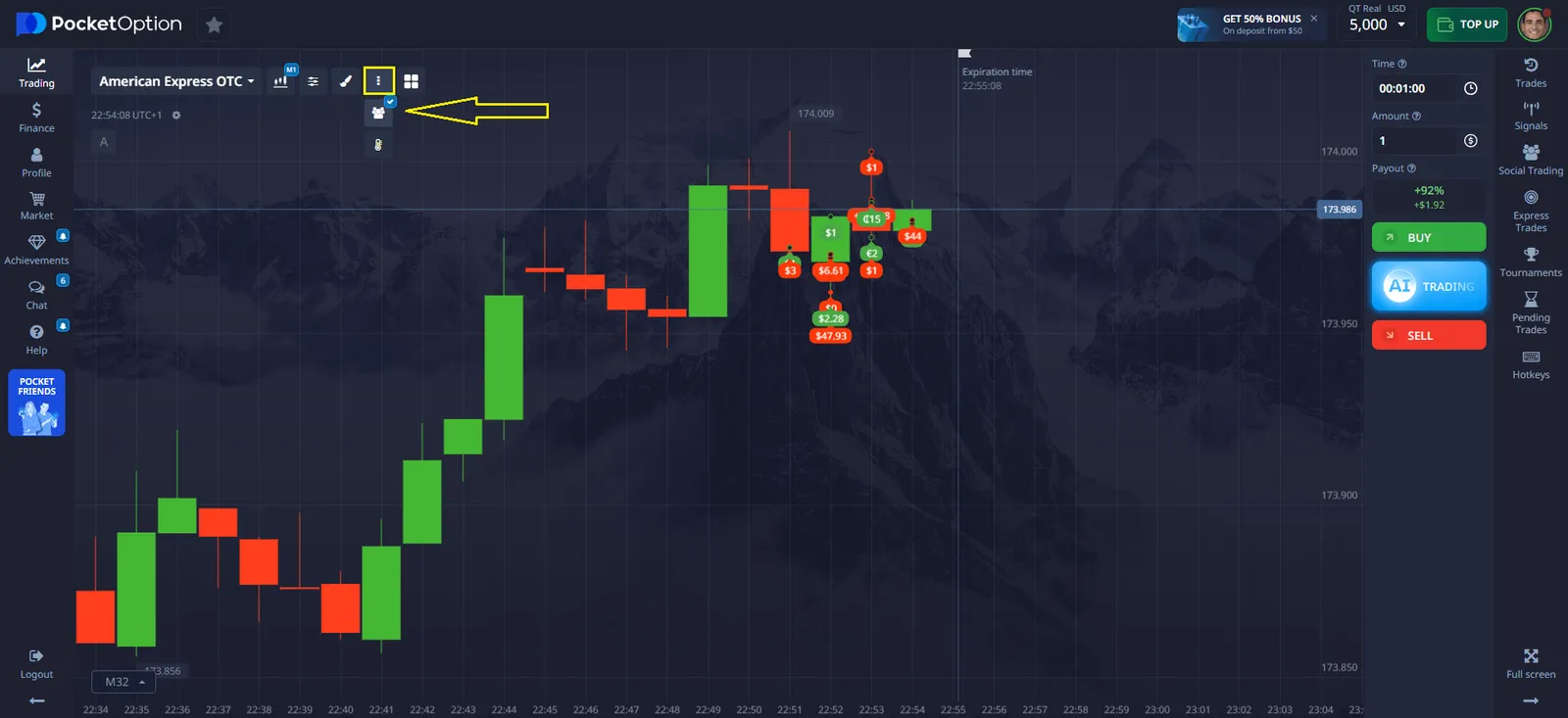
- Display Social Trades – enables the display of other users' trades on the chart.
- Watching Copied Trades – automatically adds copied traders to your watchlist.
- Hide My Profile – prevents other users from copying your trades.
How to Benefit from Copy Trading?
Copying trades can be an effective strategy when used correctly.
Key Recommendations:
- Analyze traders before copying.
- Set reasonable trade limits.
- Monitor market changes and adjust settings accordingly.
- Use Stop Balance to avoid significant losses.
How to Copy Trades Directly from the Chart
On the Pocket Option platform, trades can be copied directly from the chart.
How to Do It:
- Open the trading chart.
- Find the trader’s deal you want to copy.
- Click on it within 10 seconds.
- Confirm the copy action.
Important: If the account balance is insufficient, copying will be unavailable.
Monetizing Social Trading
Pocket Option offers a reward system for users whose trades are copied by others.
How It Works:
- Each copied trade earns gem shards.
- Shards are collected into a gem, which can be exchanged for bonuses.
- Accumulated gems can be used in the "Market" section.
Benefits of Using Copy Trading
- Automation – trades are copied without user intervention.
- Learning Opportunity – users can study strategies of successful traders.
- Accessibility – suitable even for beginners.
Limitations and Risks
Although Copy Trading is a convenient tool, it’s important to consider potential risks.
Main Limitations:
- No 100% Profit Guarantee – even experienced traders make mistakes.
- Financial Risks – improper settings can lead to significant losses.
- Dependence on Another Trader – trading success depends on the selected user.
Conclusion
Copy Trading on Pocket Option provides a powerful and efficient way to engage in trading without requiring deep market knowledge. By carefully selecting traders, configuring copy settings, and managing risk, users can enhance their trading experience and improve financial results.
Pocket Option offers a secure, user-friendly, and flexible platform, making it an excellent choice for both beginners and experienced traders. However, it is important to remember that all trading involves risks, and past performance does not guarantee future success. By using available tools wisely and continuously monitoring copied trades, traders can maximize their potential benefits while minimizing risks.
Trading on financial markets requires knowledge and experience. Many traders are discovering that copying successful traders on Pocket Option can be an effective way to learn and earn. This comprehensive overview explains how to copy Trades on Pocket Option and develop your trading strategy.
See more:copyhowplatformKnowledge baseTrading