How to Deposit on Pocket Option with Debit Card
Depositing money on Pocket Option with a debit card is one of the fastest ways to fund your account. In this guide we walk you through specific steps, limits, rules, and restrictions, to ensure your first Pocket Option deposit completes flawlessly.

Deposit with Debit Card
Visa and Mastercard are the two networks that Pocket Option accepts for card deposits. Additionally, there are over 50 other supported payment options, including e-wallets, cryptocurrencies (USDT, USDC, BTC, BNB, Dash, and so on). If you are wondering about how to add money to Pocket Option for the first time, a card is usually the easiest and quickest route. No wallet setup, no chain confirmations, no time delay. You can register and deposit with Debit Card through the link.
Quick comparison between payment methods:
Method | Typical Processing Time | Notes |
|---|---|---|
Debit/Credit Card | Under 1 minute | Fastest, easiest for most first-time deposits |
E-wallets (Volet, Jetonbank, etc) | From moments to a few hours | Good alternative if your bank blocks card payments |
Cryptocurrency (from BTC to Shiba Inu) | Minutes after blockchain confirmation | No banks involved, useful if cards aren't supported |
Bank Transfers | 3-5 business days | Secure, but slow. May not be available for some countries |
and Start Trading for Free
Get StartedHow to Deposit Money on Pocket Option with a Debit Card
Here's how to deposit money on Pocket Option with debit card, from login to confirmed balance.
Step 1: Open the Finance Section
Whether you’re in an app, or on a website, log in your account and click Finance in the left-hand panel, then select Deposit. You can also use the quick top-up shortcut on the top right of your screen (where your funds are located). This sends you straight to the deposit screen.
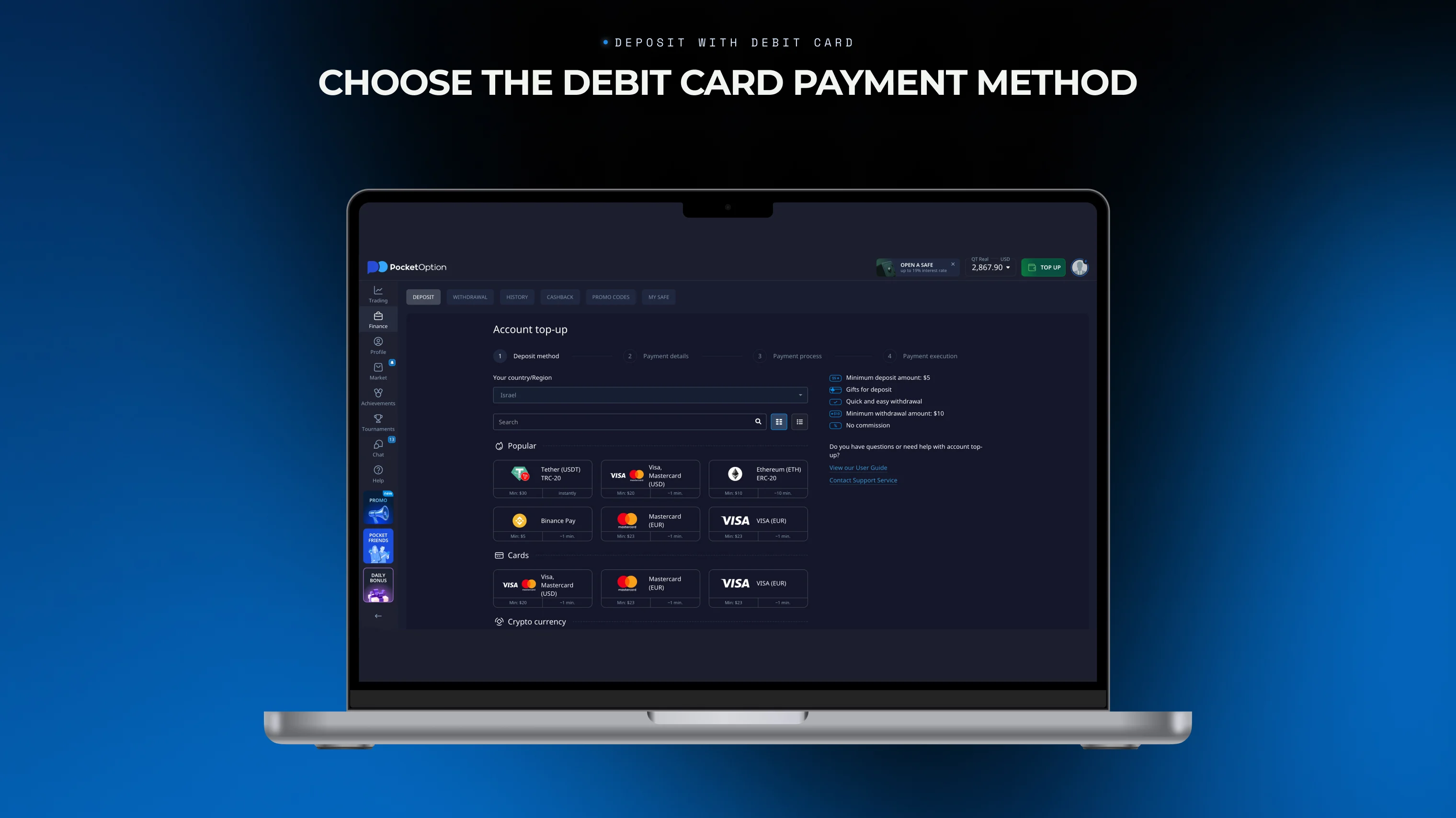
Step 2: Choose the Debit Card Payment Method
On the Deposit page, select the "Visa, Mastercard" from the list of payment options. The window will show you the minimum amount of funds accepted through this method. This amount may be shown in your local currency, depending on your settings. Keep in mind that your account balance is held in USD, and so any deposit made to Pocket Option in a different currency is automatically converted to USD the second of the transaction.
Step 3: Enter the Deposit Amount
Enter your Pocket Option promocode, if you have one, and enter the amount you wish to deposit. The Pocket Option minimum deposit for card payments is typically around ~$33, and the maximum amount per transaction is roughly ~$3300. The exact figure depends on your region, bank, and ongoing promotions.
Step 4: Finalize the Payment
Enter your card number, expiration date, and CVV code, then confirm. Make sure you are using your personal card, and not a third-party card. You will be asked to provide your name, phone, and general address. Depending on your bank, you may be asked for an SMS code or an in-app approval. When the payment is confirmed, the deposit will reflect in your account balance within minutes, including any extra funds from the promo. You can then receive your money and start trading.
Important Notes
There are no deposit fees from Pocket Option. No matter how you add money to Pocket Option, we don't charge any fees, including for currency conversion. But your bank or card provider might apply its own transaction fee, which we have no control over.
Withdrawals go back to the same method. Funds deposited by debit card can generally only be withdrawn to that same card. This is a standard anti-fraud measure used by all legitimate trading and brokerage platforms, and this is not unique to Pocket Option deposits.
Use a card registered in your name. Third-party cards (a friend's, or family member's card, for instance) can't be used for deposits. The name on the card is checked against the name provided by your account verification.
The country matters. Pocket Option, for now, doesn’t offer services to residents of EEA, USA, UK, Israel, Philippines, Japan, and Brazil. If you're in one of these regions, card deposits (and the platform overall) won't be available to you. Cards issued in some countries are also not accepted.
Daily transaction limits may apply, depending on your bank and region. If you have hit a limit, using an additional different method, like e-wallet or crypto, is usually the fastest way around this.
For a full breakdown of every deposit/withdrawal method, you can read the Pocket Option payment methods overview. It explains processing times, limits, and other specifics for cards, e-wallets, crypto, bank transfers, and various local payment systems.
Troubleshooting and Support
If your deposit has not been accepted, you can ask Pocket Option customer support about it directly, or look for common answers below:
Deposit has been declined at the payment step. Check that you have enough funds on your card. Correct card details, see if they match the information you provided through KYC. Check that the card hasn't expired. Beyond that, note that some banks can automatically block transactions to popular trading platforms as a routine risk-control measure. If this was a decision made by your bank, it usually requires a quick call to your bank to authorize the transaction.
Deposit was completed, but the balance has not updated. Card deposits are typically near-instant, but bank-side processing delays do happen. Check the History section under Finance first. If the transaction shows as Pending there, then it's usually just a matter of waiting for a few extra minutes. If it has been longer than 30 minutes with no update, please contact our support.
Verification (KYC) request during or after deposit. This is a routine step for certain regions, or above certain deposit thresholds. Have your ID or driver’s license ready, and make sure the name matches both your account and your card.
Currency conversion looks off. Your balance by default is shown in USD, so a deposit made in a local currency will be converted to it, based on the best exchange rate at the time. Pocket Option doesn’t profit from this exchange. If you want, you can select any currency as your account’s main currency, but this is visuals only. All underlying transactions and market trades will still complete in USD.
Card works for other online purchases, but not here. These are often bank's filters. Some issuers don’t accept transactions directed towards trading and brokerage platforms, if they happen out of the blue. A quick call to your bank asking them to authorize a "financial trading" or "investment" transaction usually resolves this issue.
Deposited, but can't find where the funds went. Please double-check whether you were topping up a demo account, or a real account. It's an easy toggle to miss, especially if you're switching between the two. Topping up your demo account funds is free, and doesn’t charge anything from your card.
If you are still stuck, remember: Pocket Option support team is available 24/7, both through the app, and on the website. You can also contact us directly at support@pocketoption.com. Have your transaction ID ready if you're asking questions about a specific deposit, since it speeds up the process of investigation considerably.
Disclaimer: This content is provided for educational and informational purposes only. It does not constitute financial, investment, or trading advice, nor a recommendation to buy or sell any instrument. Do your own research before acting.
See more:InterestingTrading platforms