
Download Trading App for PC – Your Quick Start to Smarter Trading
When you decide to download the trading app for PC, you are choosing not just a program, but a comprehensive solution for professional trading.

💻 How to Download trading app for pc (Windows & macOS) from Pocket Option?
Whether you're using Windows 7, 10, or macOS, downloading the trading app means accessing a web-based platform that runs directly in your browser. No additional software or installation is required -- making the process fast, easy, and hassle-free.
For Windows:
- Visit the main Pocket Option page with the button below.
- Log into your account or create one in seconds.
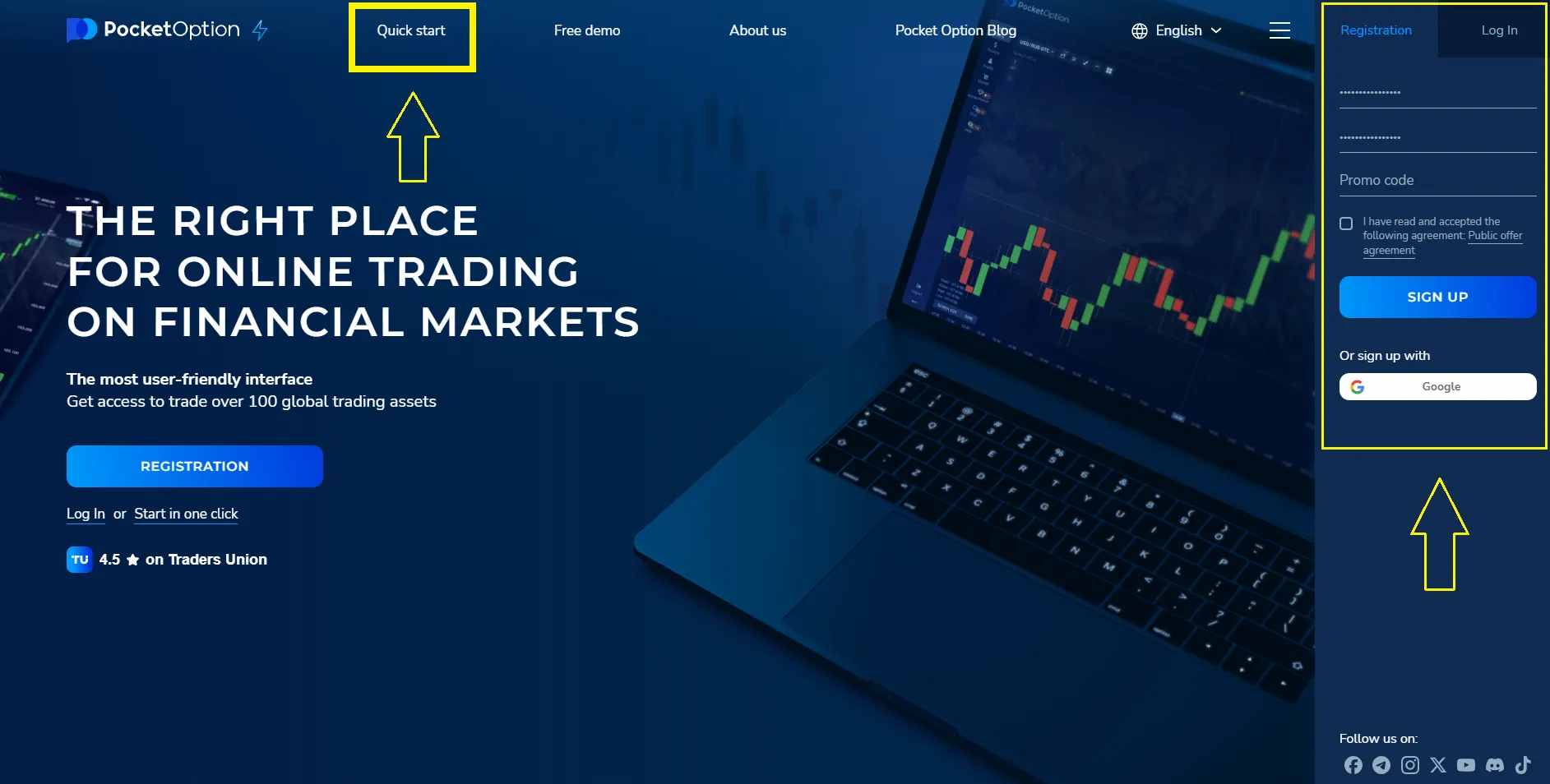
- Click “Quick Start” - the platform will open as a browser-based web app.
- Begin trading instantly from your desktop. Get a bonus for the first deposit!
⚡ Simple, fast, and fully compatible with desktop systems.
For macOS:
- Open the platform main page via Safari, Chrome, or any modern browser.
- Sign in or register for an account.
- Click “Quick Start” and launch the trading platform -- no installation needed.
- Access all features directly in your browser.
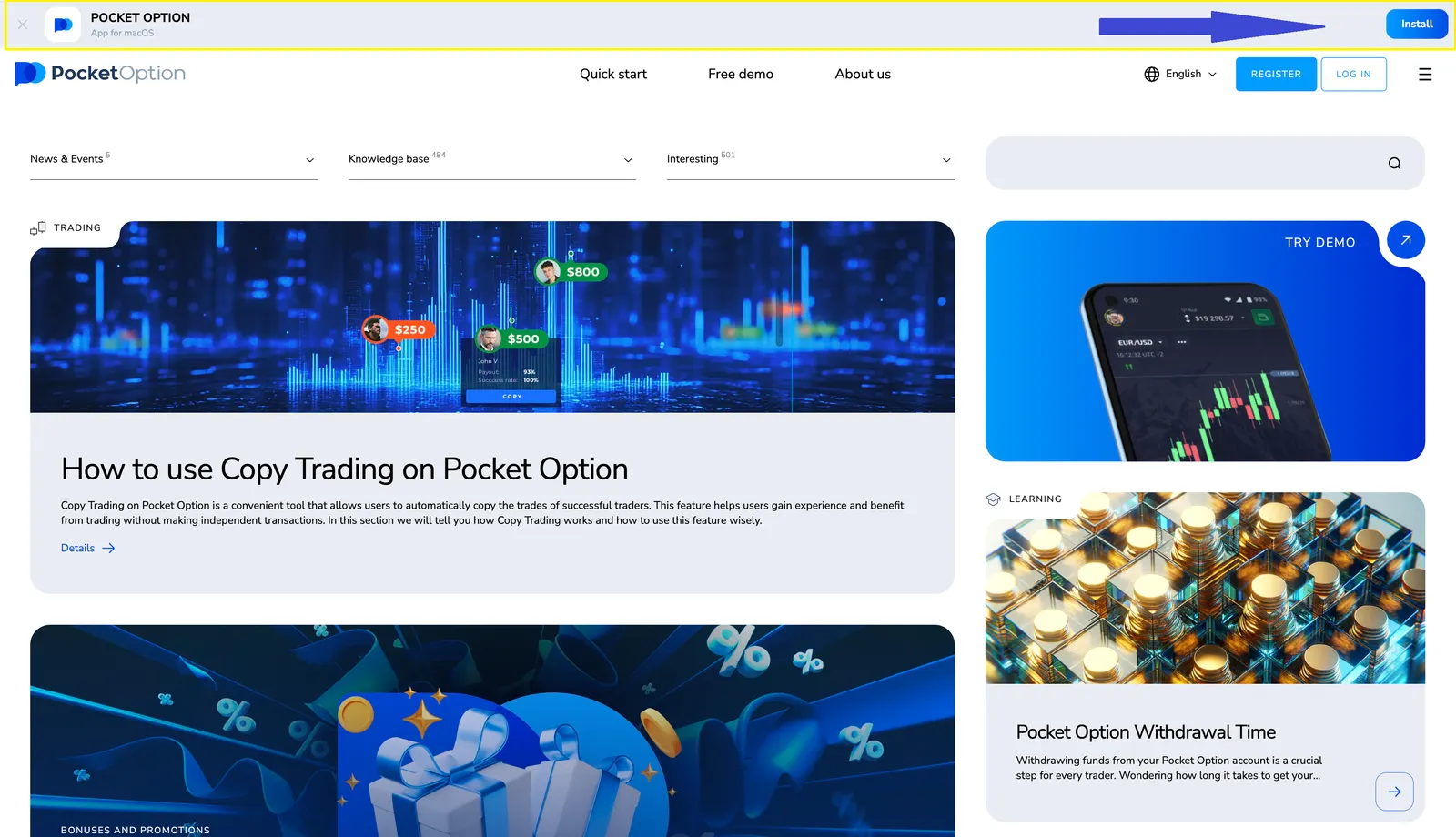
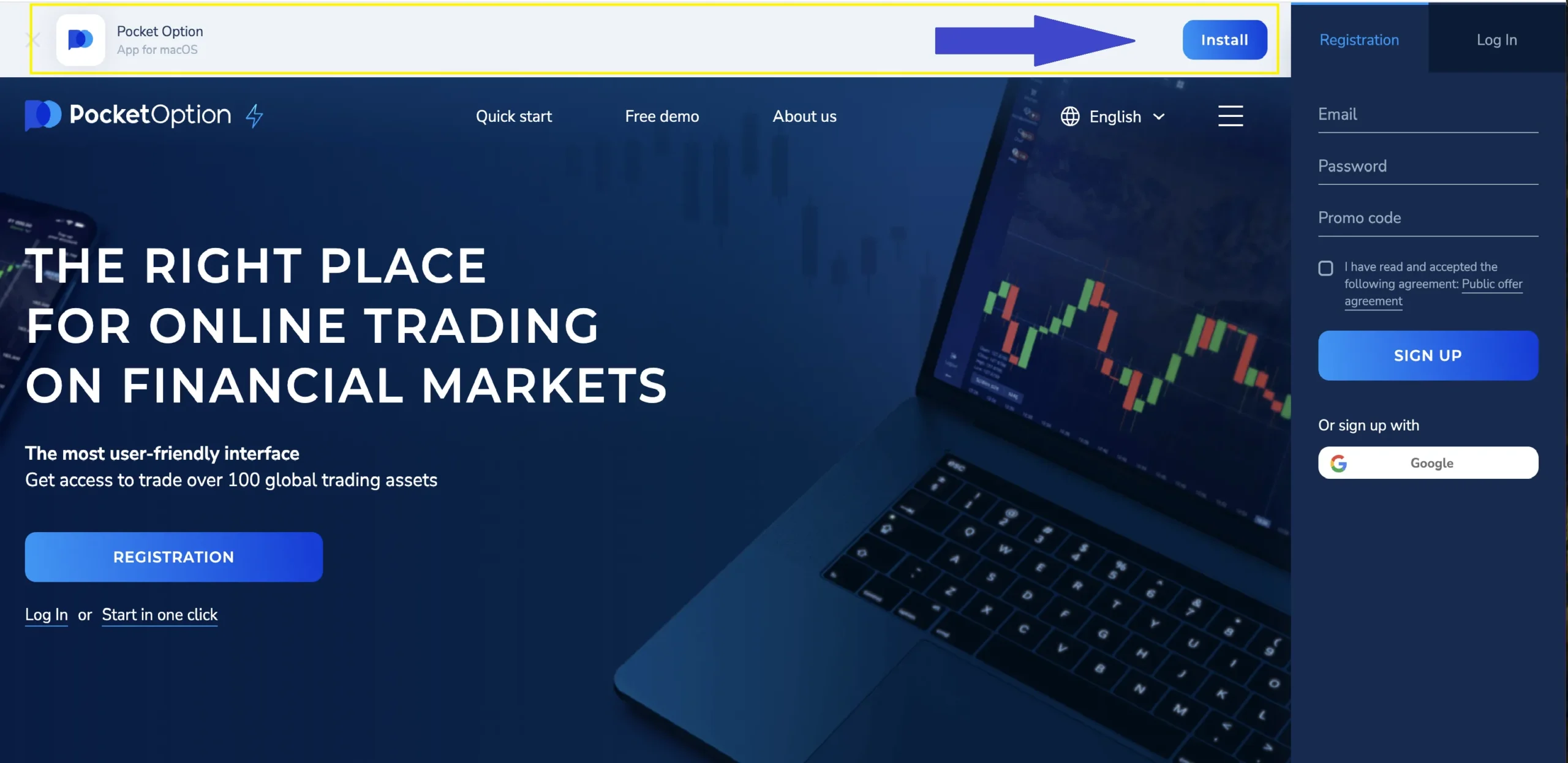
👉 👉 👉 Prefer direct access? You can launch the Pocket Option desktop app for Mac right from our blog -- just click the dedicated button on your page, as shown in the screenshot below!
💼 Download 👉 Deposit 👉 Dominate
Start with just $5 and unlock the full power of Pocket Option on your desktop. Enjoy lightning-fast execution, 100+ assets, advanced tools -- and get a deposit bonus to boost your balance instantly!
✅ Real account = real benefits:
- Earn real profits and withdraw anytime
- Activate bonuses and promo codes
- Copy top traders automatically
- Join tournaments with real prizes
- Use trading bots and signal tools
- Access advanced analytics and VIP features
💵 Start with just $5 (may vary depending on Geo and payment method), get a deposit bonus, and unleash your full trading potential -- all from your desktop.
🚀 Why Traders Prefer Pocket Option on Desktop
Trading from a PC provides accuracy, scale, and access to advanced features:
| Advantage | What You Get |
|---|---|
| 📈 Larger Screen | Better view of charts and market trends |
| ⚙️ Advanced Analysis Tools | 30+ indicators, multi-chart setup, full technical analysis suite |
| 🎯 Maximum Control | Manage trades more precisely with mouse and keyboard |
| 🌐 Browser-Based Access | No downloads -- just log in and start |
| 💹 100+ Tradable Assets | Currencies, crypto, stocks, indices, and commodities |
| 🧪 $50,000 Demo Account | Practice risk-free under real market conditions |
The platform offers a seamless experience with speed, flexibility, and powerful tools -- everything a serious trader needs.
👉 In the next section of this article, we’ll explore other popular trading apps for PC and explain how to download and set them up step by step.
Top 5 Trading Platforms for PC in 2025: In-Depth Review and Selection Guide
In 2025, trading on financial markets requires not only knowledge and strategies but also reliable tools. Choosing the right trading platform for your PC can significantly influence your success, whether you are a beginner or an experienced trader. In this review, we take a detailed look at the five best platforms available for personal computers, their features, advantages, disadvantages, and installation methods. You will learn how to download trading applications for PC free of charge, including versions for Windows 10 and Windows 7, and receive recommendations on how to choose the optimal solution.
Why Choosing the Right Trading Platform Matters
A trading platform is your primary tool for market analysis, trade management, and strategy execution. Choosing the wrong platform can lead to wasted time, financial losses, and missed opportunities. Here are the key criteria to consider:
- Type of trading: Support for the markets you need (Forex, stocks, cryptocurrencies, quick trading).
- Functionality: Availability of analysis tools, order types, and automation features.
- Interface: Ease of customizing charts and the workspace.
- System requirements: Compatibility with your operating system (e.g., Windows 10 or Windows 7).
- Demo mode: The ability to test the platform without financial risks.
Downloading Trading Applications for PC: General Recommendations
Many traders are looking for ways to download a trading application for PC free of charge, especially for popular operating systems such as Windows 10 and Windows 7. Modern platforms offer different installation options: from native applications to web-based versions and Progressive Web Apps (PWA). For example, you can download TradingView for PC through the official website or install it as a PWA for Windows 10, which does not require complex installation. Here is the general process for most platforms:
- Visit the official website of the platform (e.g., TradingView).
- Locate the download section — often marked with a button such as "Download trading app for PC free."
- Choose the version for your operating system (for example, "TradingView download for PC Windows 10" or "Windows 7").
- Follow the installation instructions or add the application to your desktop via the browser.
These steps apply to most platforms, including MetaTrader 5 and TradingView, which can be downloaded free for PCs running Windows 10 or Windows 7.
1. TradingView — A Leader in Market Analysis
Who It Is For
TradingView is ideal for traders who value advanced technical analysis and access to data from multiple exchanges. It is a universal platform for those who want to download a trading app for PC with Windows 10 or Windows 7 and use advanced charting tools.
Advantages
- More than 100 built-in indicators and the ability to create custom ones using Pine Script.
- Access via browser, PWA, or native app — you can choose TradingView download for PC based on your preference.
- A social network for traders to exchange ideas and strategies.
Disadvantages
- No built-in trading — requires integration with a broker.
- Full functionality is only available in the paid versions.
How to Download TradingView for PC
TradingView offers several usage options. You can download TradingView for PC free of charge as follows:
- Windows 10: Open the website in Chrome or Edge, click “Install” for the PWA, or start TradingView download for PC Windows 10 or other operating systems.
- Windows 7: Similarly, use the PWA option or download TradingView for PC Windows 7 through third-party sources such as Softonic.
2. MetaTrader 4/5 (MT5) — A Professional Choice for Forex
Who It Is For
MetaTrader 4 and 5 are powerful applications for traders operating in the Forex and CFD markets, especially those who use automated trading systems.
Advantages
- Supports 21 timeframes and more than 80 built-in indicators.
- Integrated development environment for trading robots (MQL5).
- Free download — you can download the trading application for PC with Windows 10 free of charge from the official website.
Disadvantages
- Complex interface for beginners.
How to Download MT5
To download the trading application for PC with Windows 10 or Windows 7:
- Visit metatrader5.com.
- Click “Download MetaTrader 5” and select the version for your operating system.
- Run the installer and connect the platform to your broker account.
3. cTrader — A Modern Alternative to MT5
Who It Is For
cTrader is aimed at traders looking for trade transparency and a modern interface for Forex trading.
Advantages
- Direct market access through ECN.
- Intuitive design and more than 70 indicators.
- Free installation for Windows 10.
Disadvantages
- Fewer brokers support cTrader compared to MT5.
Limited compatibility with Windows 7.
How to Download
You can download the trading application for PC free of charge from the official website. The installer is compatible with Windows 10. For Windows 7, the web version is recommended.
4. Thinkorswim — A Tool for U.S. Professionals
Who It Is For
Thinkorswim is designed for traders working with U.S. stocks and options, with a focus on in-depth analysis.
Advantages
- More than 300 indicators and powerful market scanners.
- Demo account with $100,000 in virtual funds.
- Integration with news feeds such as CNBC.
Disadvantages
- Access is limited to U.S. residents.
- High system requirements.
How to Download
To install, visit TD Ameritrade, select “Download Thinkorswim,” and follow the instructions.
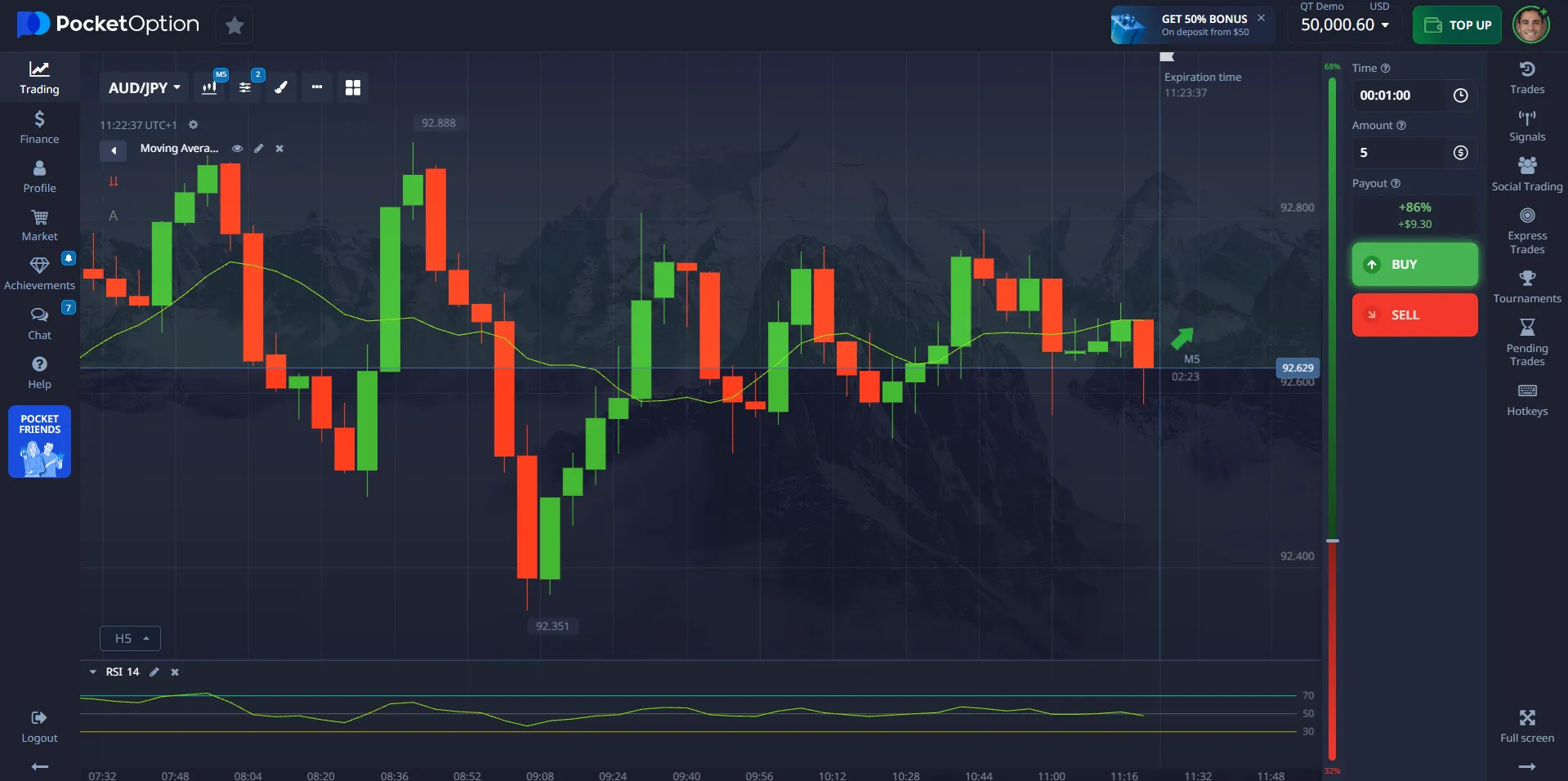
5. Pocket Option — A Solution for Quick Trading
Who It Is For
Pocket Option is aimed at beginners and traders who prefer quick trading.
Advantages
- Minimum deposit of $5 and a demo account with $50,000.
- Operates directly in the browser without the need for installation.
Disadvantages
- Limited analytical tools.
How to Start
Visit pocketoption.com, register, and start trading in the browser. A PWA version is available for Windows 10.
Which Platform Should You Choose?
The best platform depends on your goals:
- For analysis: TradingView — download TradingView for PC and gain access to advanced charts.
- For Forex: MetaTrader 5 or cTrader — both are available for free download.
- For quick trading: Pocket Option — a simple solution with no complex installation.
- For professionals in the U.S.: Thinkorswim — a powerful tool with a demo mode.
Comparison Table: Pocket Option vs Competitors
| Criteria | Pocket Option | MetaTrader 5 | cTrader | Thinkorswim | TradingView |
| Platform Type | Web / PWA | Native | Native | Native | Web / PWA |
| Minimum Deposit | $5 | Depends on broker | Depends on broker | $0 (but margin trading requires a minimum) | Free (PRO from $14.95) |
| Demo Account | ✅ $50,000 | ✅ | ✅ | ✅ $100,000 | ❌ (only with paid plans) |
| Social Trading | ✅ | ❌ | ❌ | ❌ | ✅ (partial) |
| Automation | AI | ✅ (MQL5) | ✅ (cAlgo) | ✅ (ThinkScript) | ❌ |
| Quick Trading | ✅ | ❌ | ❌ | ❌ | ❌ |
| Forex / CFD | ✅ | ✅ | ✅ | ✅ | ❌ (analysis only) |
| Hotkeys | ✅ | ✅ | ✅ | ✅ | ✅ |
| Multi-Chart Layouts | ✅ (up to 6) | ✅ | ✅ | ✅ | ✅ |
| Mobile Version | ✅ | ✅ | ✅ | ✅ | ✅ |
In 2025, the market offers a wide range of trading platforms for PC, each designed to meet specific needs. You can download a trading application for PC with Windows 10 free of charge, whether it is TradingView, MetaTrader 5, or other platforms from our list. Before making a choice, be sure to test them using demo accounts to ensure they meet your trading requirements.
Why Pocket Option is Your Best Choice for PC Trading
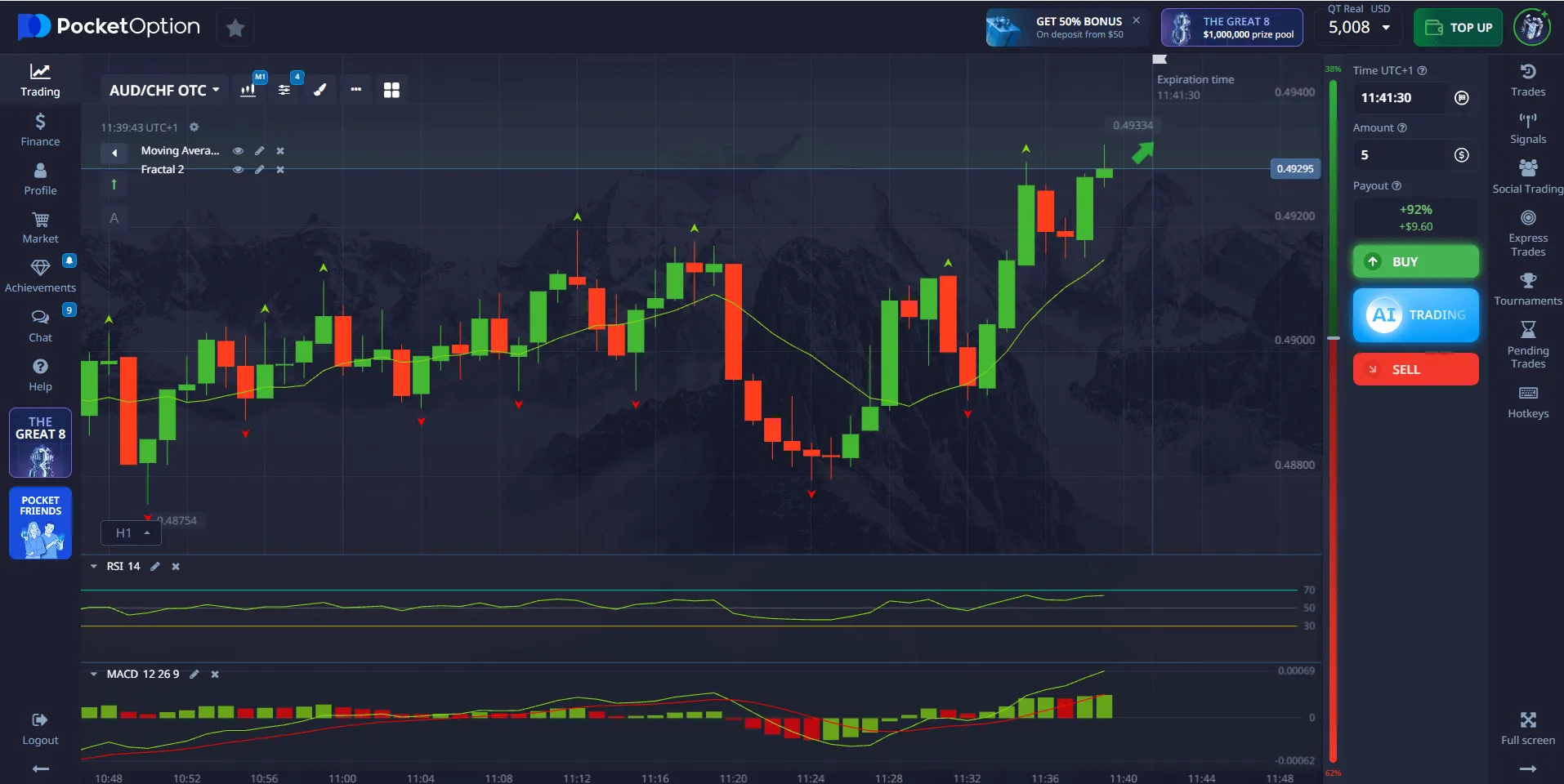
Pocket Option has established itself as one of the leading brokers in the industry, serving millions of traders worldwide. Their trading platform for PC combines cutting-edge technology, an intuitive interface, and powerful analytical tools—making trading accessible to both beginners and seasoned professionals.
Deep Dive into PC Trading with Pocket Option
Trading on financial markets requires not only knowledge and strategy but also the right tools. In this context, a desktop application becomes an essential assistant. The native Pocket Option app for PC ensures maximum stability and speed. This is especially important for day traders and scalpers, where every millisecond counts. The trading platform allows you to respond instantly to market changes, open and close trades without delay, which directly impacts profitability. Moreover, the desktop version offers a wider range of features and customization options for your workspace, making the trading process more comfortable and efficient.
We’ll explore why Pocket Option is the optimal choice for those looking for a reliable and functional trading application for their personal computer. We’ll dive into its unique features, compare it with competitors, and provide a detailed guide so you can begin your journey toward successful trading today.
Pocket Option: A Revolution in Desktop Trading Applications
Why Pocket Option Is a Leader Among Trading Platforms
Pocket Option is an innovative platform that constantly evolves and adapts to the needs of modern traders. Here’s what makes their PC platform exceptional:
Regulation and Security: The Foundation of Trust
Pocket Option is regulated by international financial authorities, ensuring the safety of your funds and adherence to the highest industry standards. This is not just a formality, but a key factor that brings peace of mind to traders. Regulation means the broker must follow strict rules and procedures aimed at protecting client interests.
Wide Range of Trading Assets: Unlimited Opportunities
The platform provides access to over 100 trading assets, opening up limitless opportunities for traders to diversify their portfolios and find profitable trades. This extensive selection allows adaptation to various market conditions and supports diverse trading strategies. Available assets include:
- Currency pairs (Forex): From major pairs like EUR/USD and GBP/JPY to exotic ones, enabling you to trade on the world’s largest financial market.
- Stocks of major global companies: Trade shares of giants like Apple, Google, Microsoft, Amazon, and many more—benefiting from stock market movements.
- Indices: Invest in indices such as SP 500, US100, and others, reflecting the overall health of the economy or specific sectors.
- Commodities: Profit from price fluctuations in gold, silver, oil, gas, and other resources often influenced by geopolitical and economic events.
- Cryptocurrencies: Take advantage of the high volatility and growth potential of cryptocurrencies like Bitcoin, Ethereum, Litecoin, Ripple, and many others—now an integral part of modern finance.
This variety of assets allows traders to go beyond a single market, distribute risk, and search for the most promising investment opportunities based on their preferences and market analysis. Download trading app for PC free!
Minimum Deposit and Accessibility: Trading for Everyone
Pocket Option makes trading accessible to all users by offering a low entry barrier. With a minimum deposit starting at just $5 and trades from $1, anyone can begin their trading journey regardless of budget or experience level. This affordability allows beginners to enter the market with minimal risk while still enjoying access to a professional-grade platform.
Key Advantages of Pocket Option:
✅ Free installation and usage
✅ Compatible even with older systems
✅ Optimized for modern operating systems
✅ Access to over 100 trading assets — currencies, crypto, indices, stocks
✅ $50,000 demo account for learning and practice
✅ Minimum deposit from $5 and trades from $1
✅ Hotkey support, multi-chart layout, and customizable interface
✅ Regulation and fund protection on an international level
Who Is Pocket Option For?
Beginners
- Can start with a demo account to practice without risking real money
- Will easily navigate the platform thanks to its intuitive interface
Experienced Traders
- Will appreciate the broad set of tools and ability to implement advanced strategies
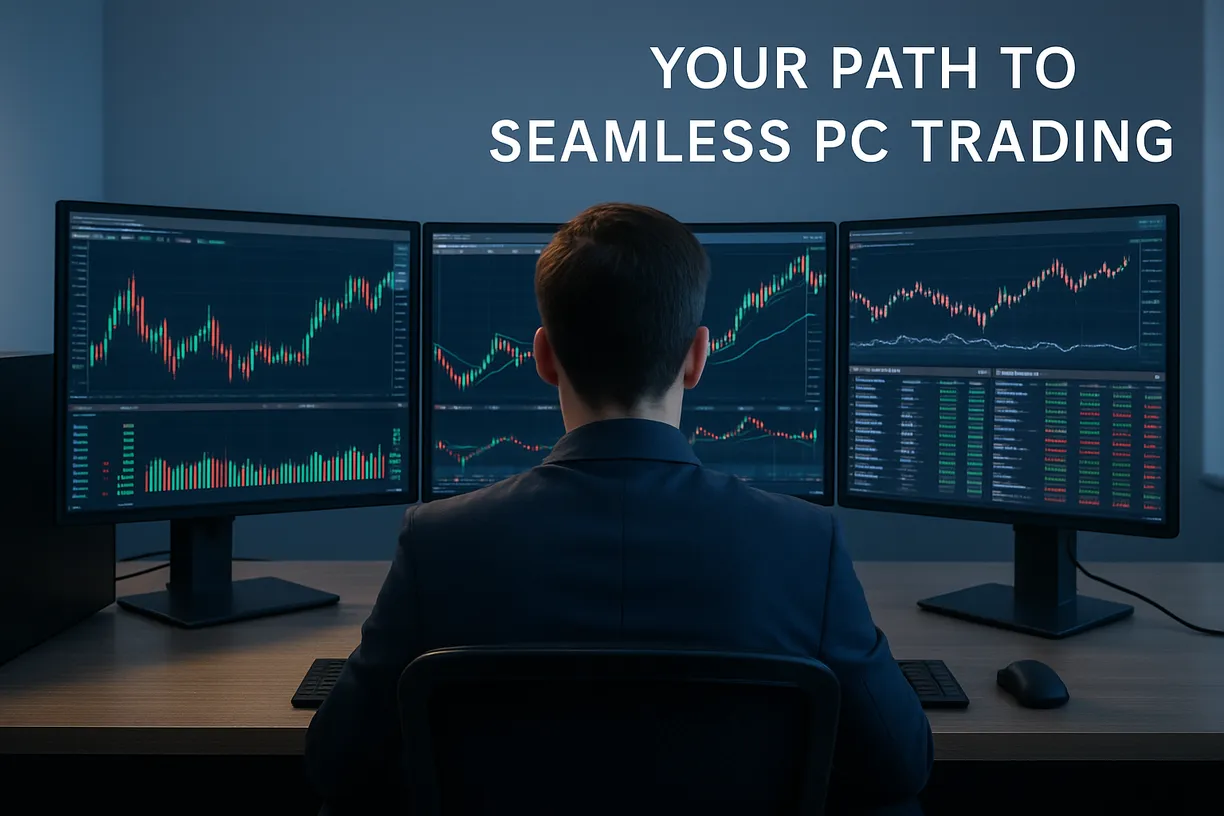
- Can connect 2–3 monitors and customize their trading workspace
Laptop and Older PC Users
- Can download trading app for PC Windows 7! The platform is optimized and runs smoothly even on Windows 7 with 4GB of RAM
Professionals
- Use API and integration with TradingView (web/PWA: TradingView download for PC Windows 10/7)
- Automate routine tasks. Start download trading app for PC Windows 10 free!
How to Download and Install app on PC: Step-by-Step Guide
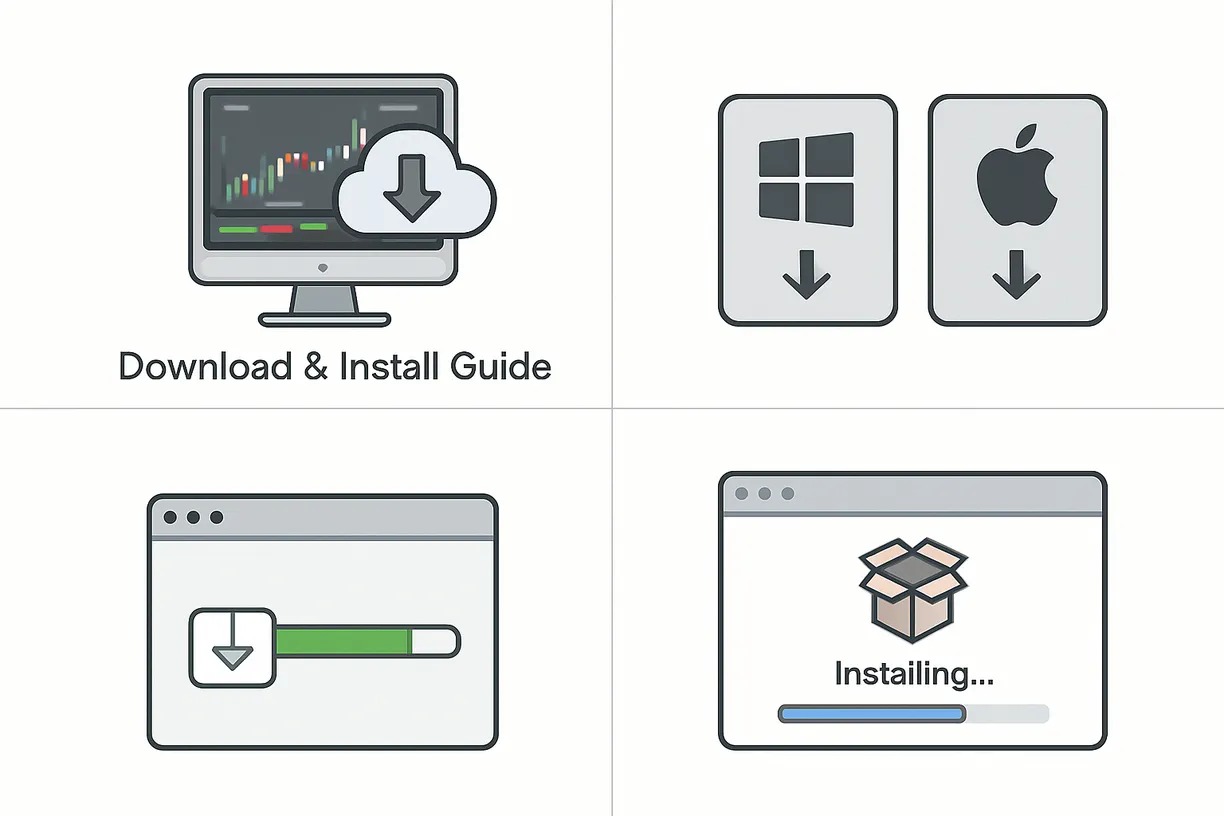
Installing the application is the first step toward stable and successful trading.
Unlike many brokers, Pocket Option provides a completely free app that can be downloaded in just a few minutes and installed on any modern computer.
In this section, you’ll learn everything about downloading, installing, and setting up the application for both Windows and macOS.
Step 1: Go to the Official Pocket Option Website – Your Starting Point
Open our blog in your web browser (Google Chrome, Mozilla Firefox, Microsoft Edge, or any other you prefer) and click the register button on the top menu or one of the buttons in this article. You’ll be instantly redirected to the Pocket Option trading platform homepage.
Make sure you're using the official domain to avoid phishing websites and ensure the safety of your data.
Step 2: Choose the Version for Your Operating System – Windows or macOS
Pocket Option offers native web applications for both Windows and macOS users, delivering optimal performance and stability across both platforms.
Installation on Windows: Step-by-Step Instructions
- Click the register button in our official Pocket Option blog article
- Log in or sign up, then click “Trade”
- Start trading!
For macOS: Download and Compatibility Features
Apple users can enjoy all the benefits of the web application for PC Pocket Option.
When you download the Pocket Option app for macOS, you're actually accessing a browser-based web application.
Here’s how to begin:
- Navigate to the Official Site: Use our quick-access button to head straight to the Pocket Option homepage.
- Launch the Web App: Look for the web app download link on the main page and click it. The app will open automatically in your browser—no setup required.
Start Trading: Once the app loads, simply sign in or register to begin trading instantly, with no extra downloads or installations.
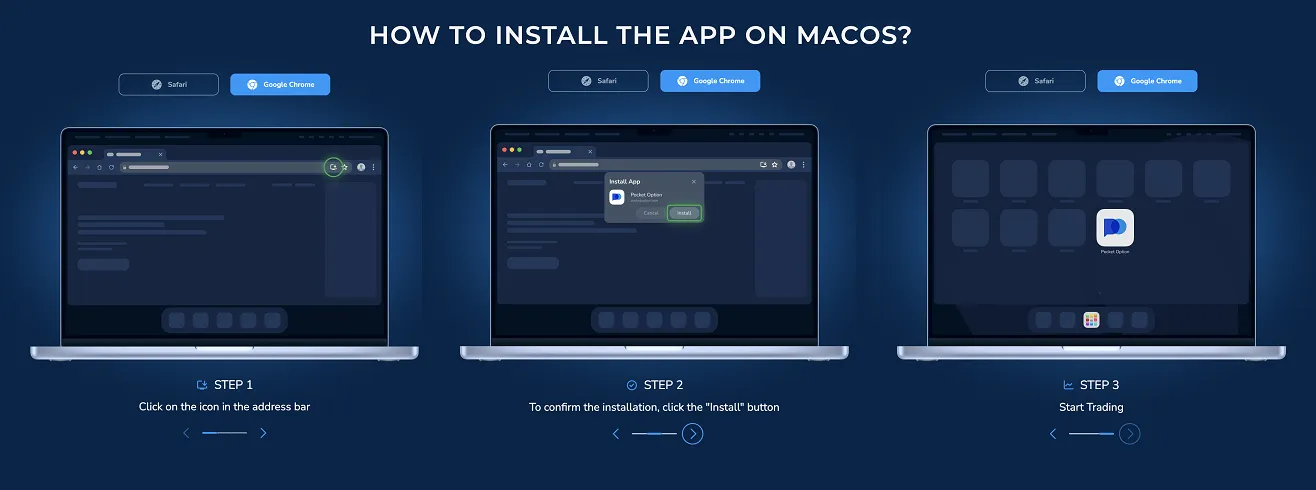
Installation on macOS: Quick and Easy
Installing on macOS is even simpler and takes just a few seconds:
- Open the platform in Safari
- A “Install” button will appear in the top-right corner of the browser
- Click the button and confirm — a shortcut will appear on your desktop
Step 3: First Launch and Setup – Your Trading Dashboard
Once the installation is complete, it’s time to launch the application and configure it to your preferences.
- Open the Pocket Option web application
- Select your interface language. Pocket Option supports over 20 languages, making it accessible for traders around the world. Choose the one that suits you best.
- Choose your account type:
• Demo account: $50,000 in virtual funds for practice
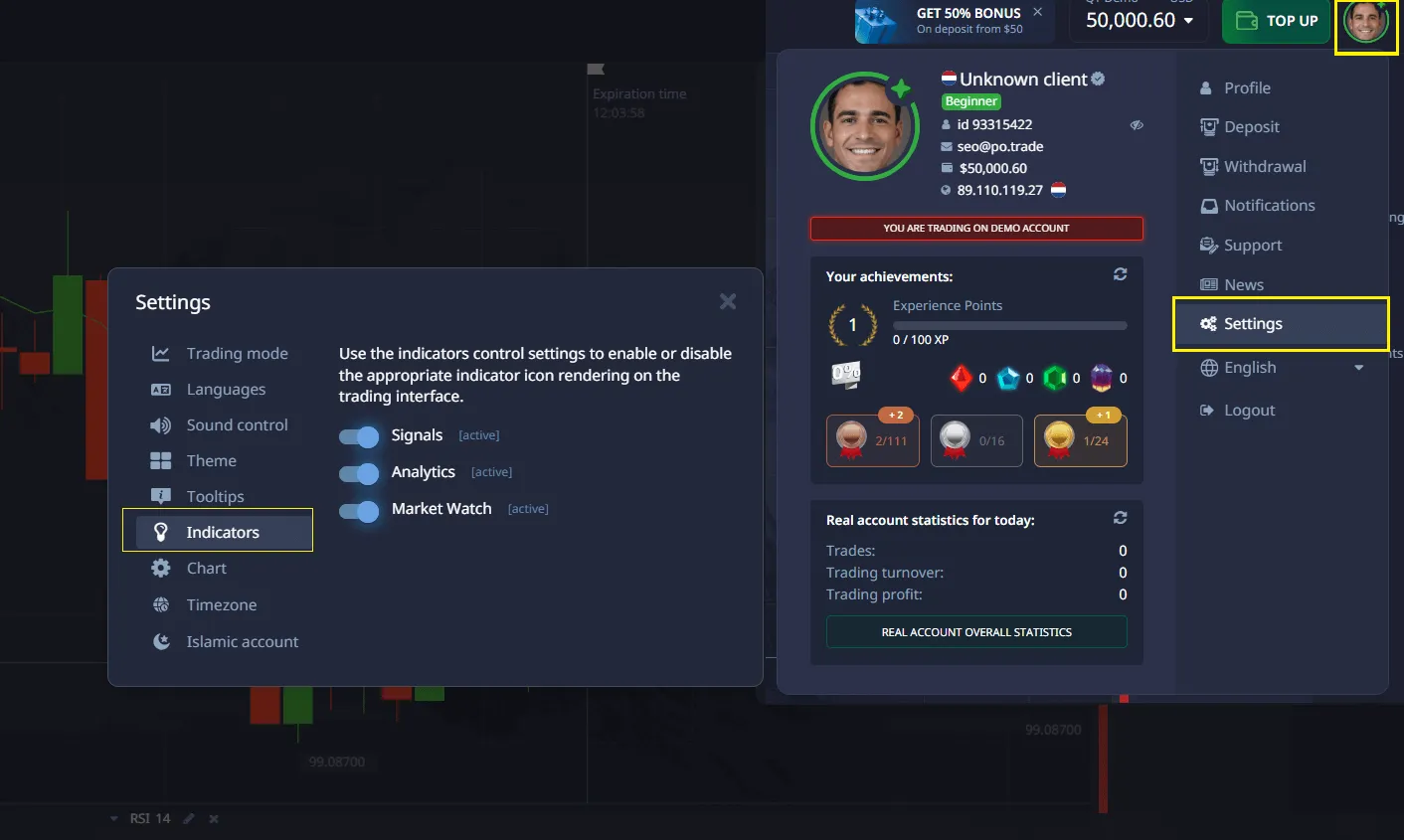
• Real account: for live trading with real money - Customize your interface: go to the profile menu → settings. You can enable or disable features like AI Trading, Market Watch, choose a color theme, and adjust other preferences.
Advantages of the Web Application for PC Windows and macOS:
- Runs in a separate window without browser toolbars
- Quick access from your desktop
- Automatic updates
- Efficient use of computer resources
Interface and Workspace of Pocket Option
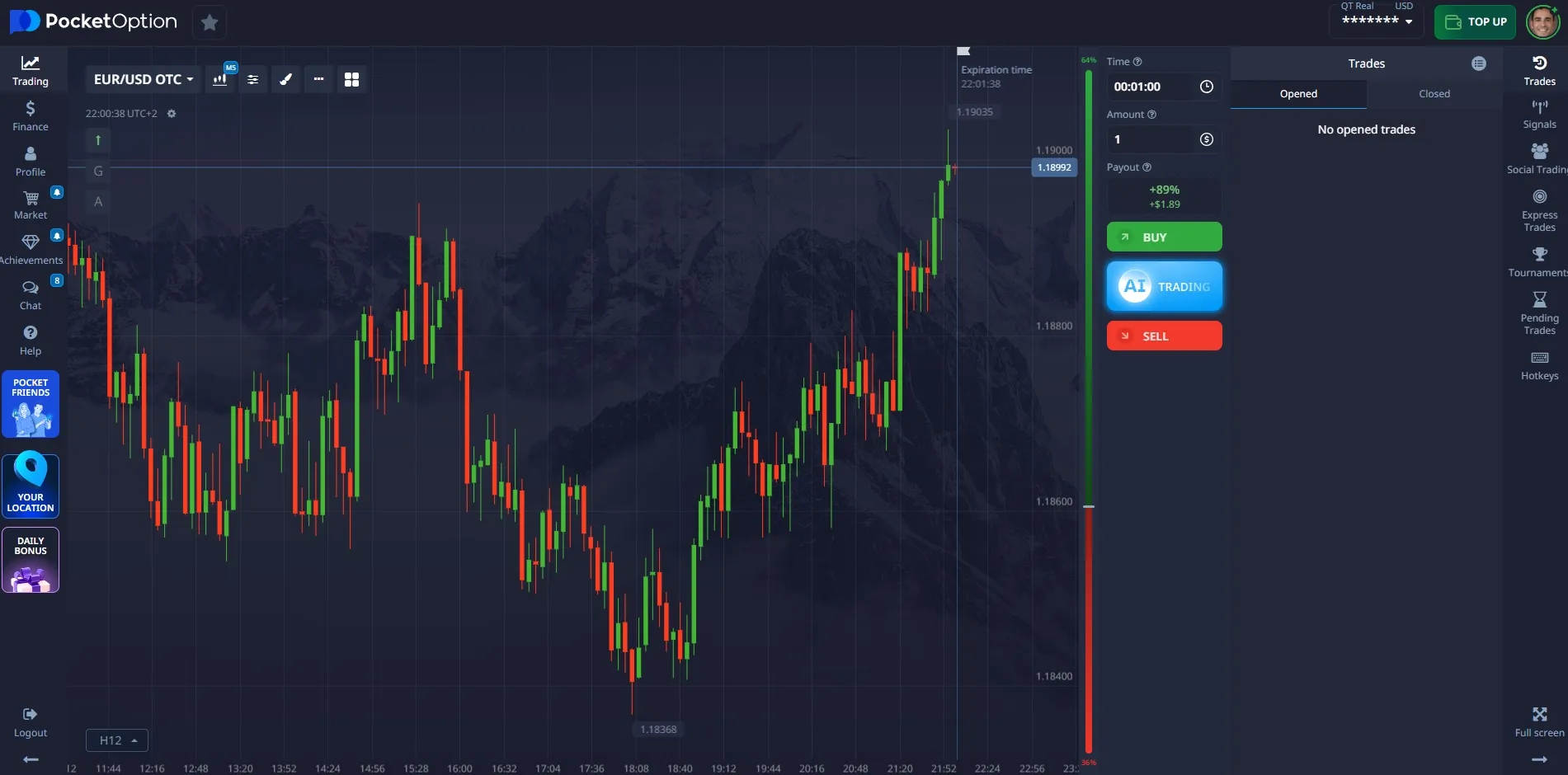
After installing and launching the application for the first time, you’ll arrive at the main screen of the Pocket Option terminal. This is where your journey into the financial markets begins. A properly configured interface helps you react faster to signals, follow your strategy, and maximize profits.
In this section, we’ll cover in detail:
- How the interface is structured
- How to customize it for your needs
- What multi-chart mode is
- What types of charts are available
- How to speed up your workflow using hotkeys
Main Screen: Layout and Purpose
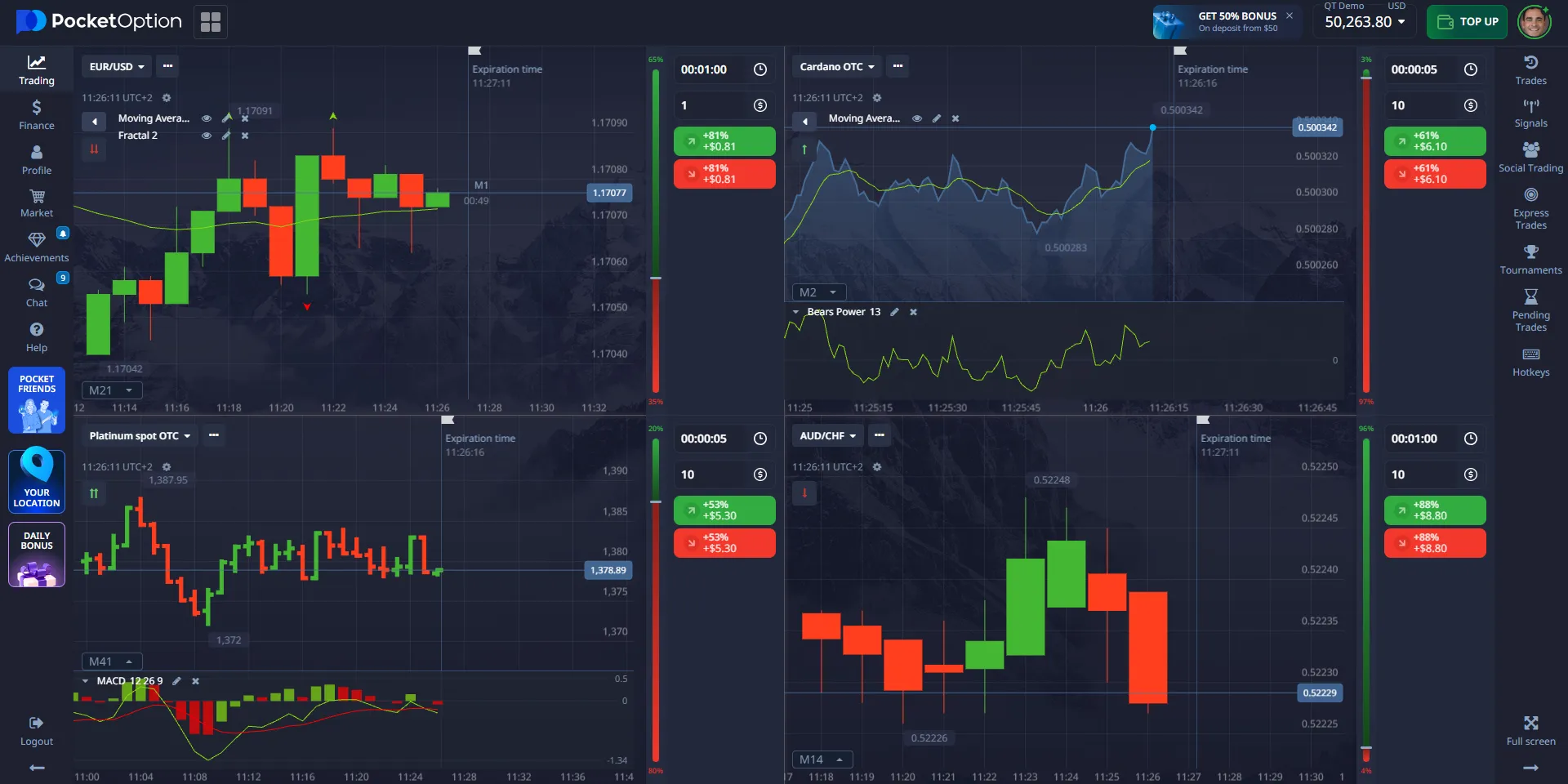
When you open the terminal, you’ll see a window divided into several key areas.
1️. Price Chart
This is the central part of the screen, where the selected asset’s price movement is displayed.
✅ You can zoom in and out
✅ Supports up to 6 charts simultaneously in multi-window mode
✅ Switch between assets with a single click
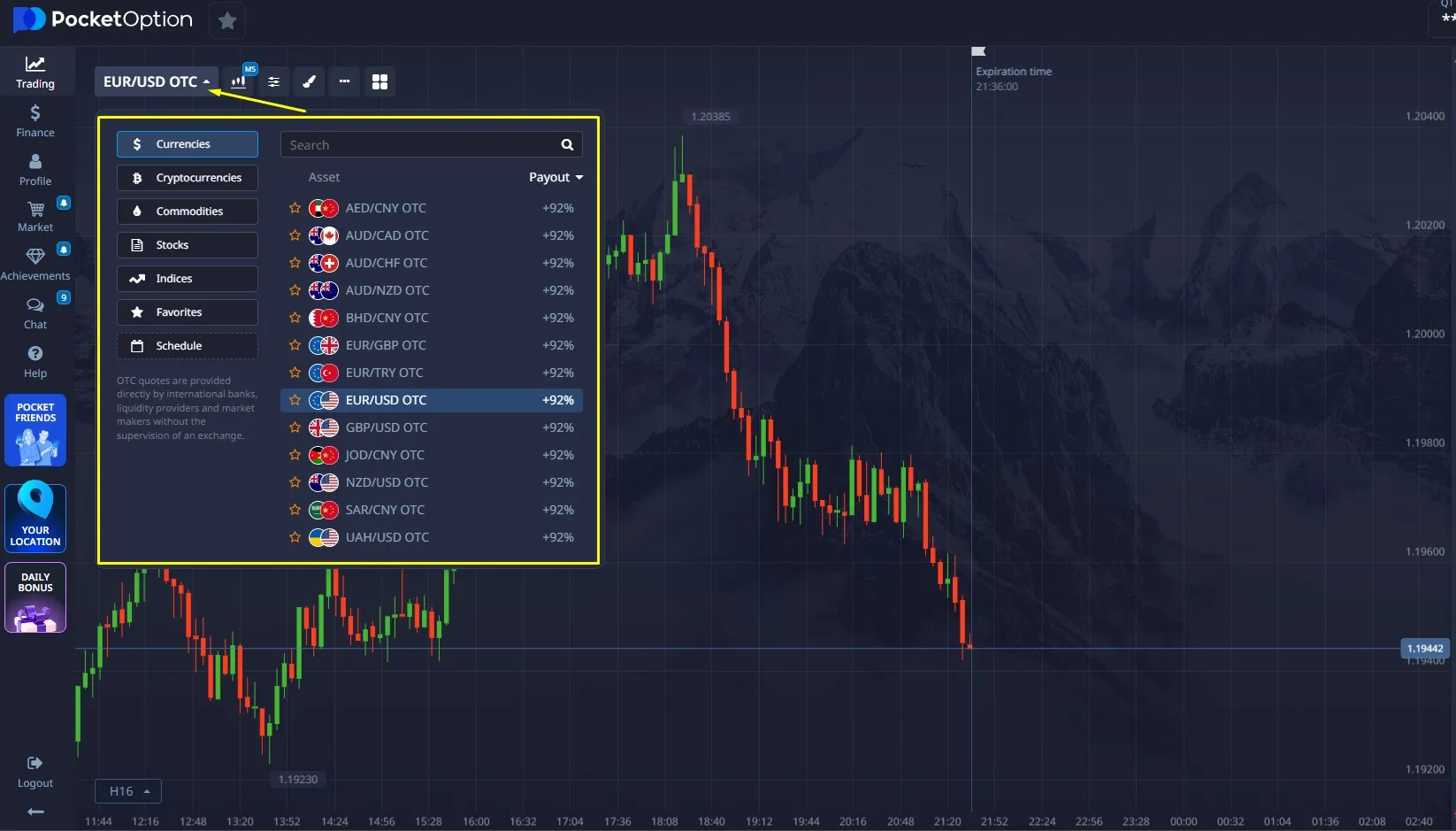
2️. Asset Panel
On the left side, you’ll find a list of available instruments:
- Currency pairs
- Cryptocurrencies
- Indices
- Stocks
Over 100 assets are available directly within the application.
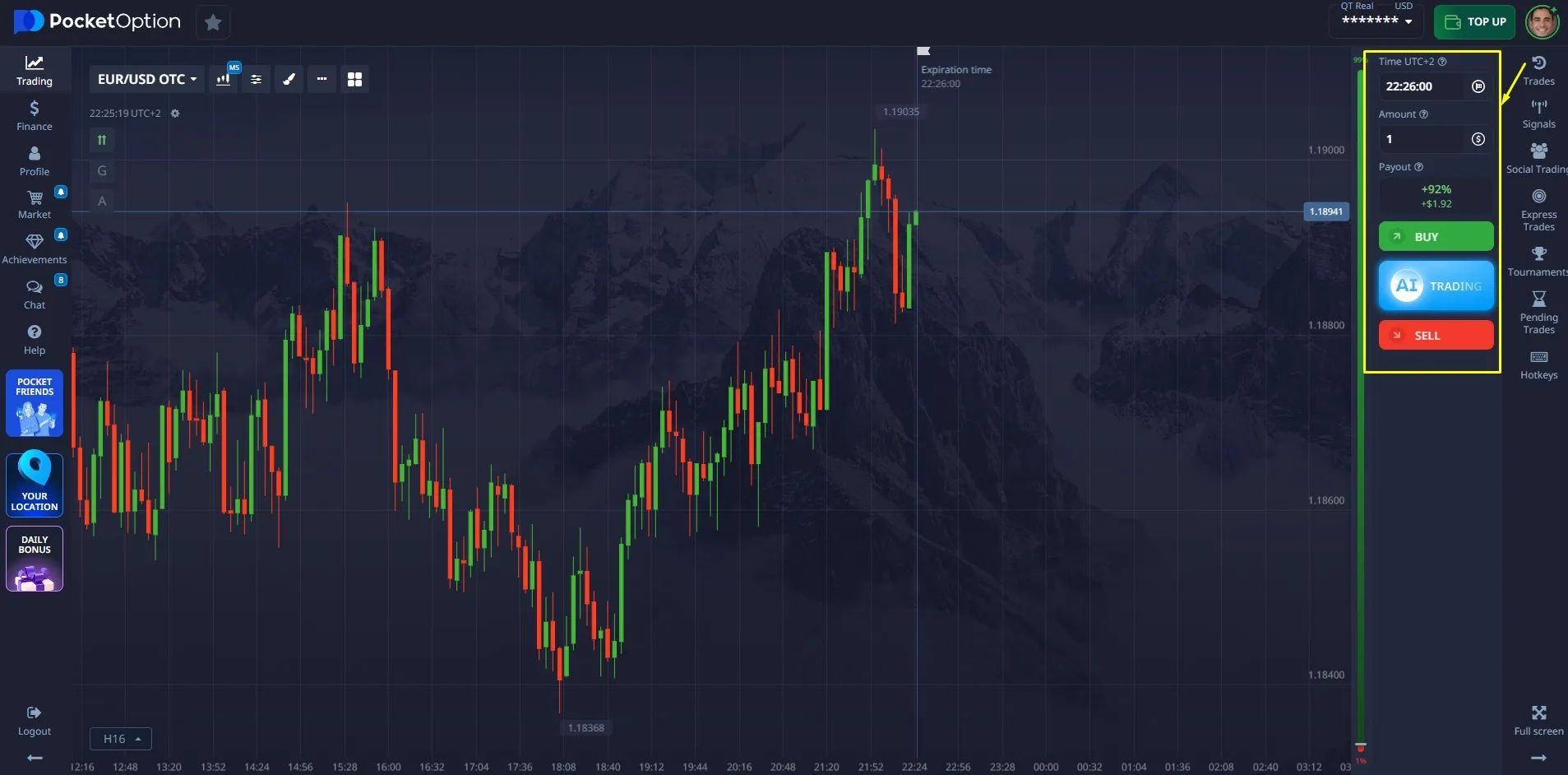
3️. Order Panel
On the right side, you’ll see the trade execution window, where you can:
- Choose the direction (Up/Down)
- Set the expiration time
- Enter the trade amount
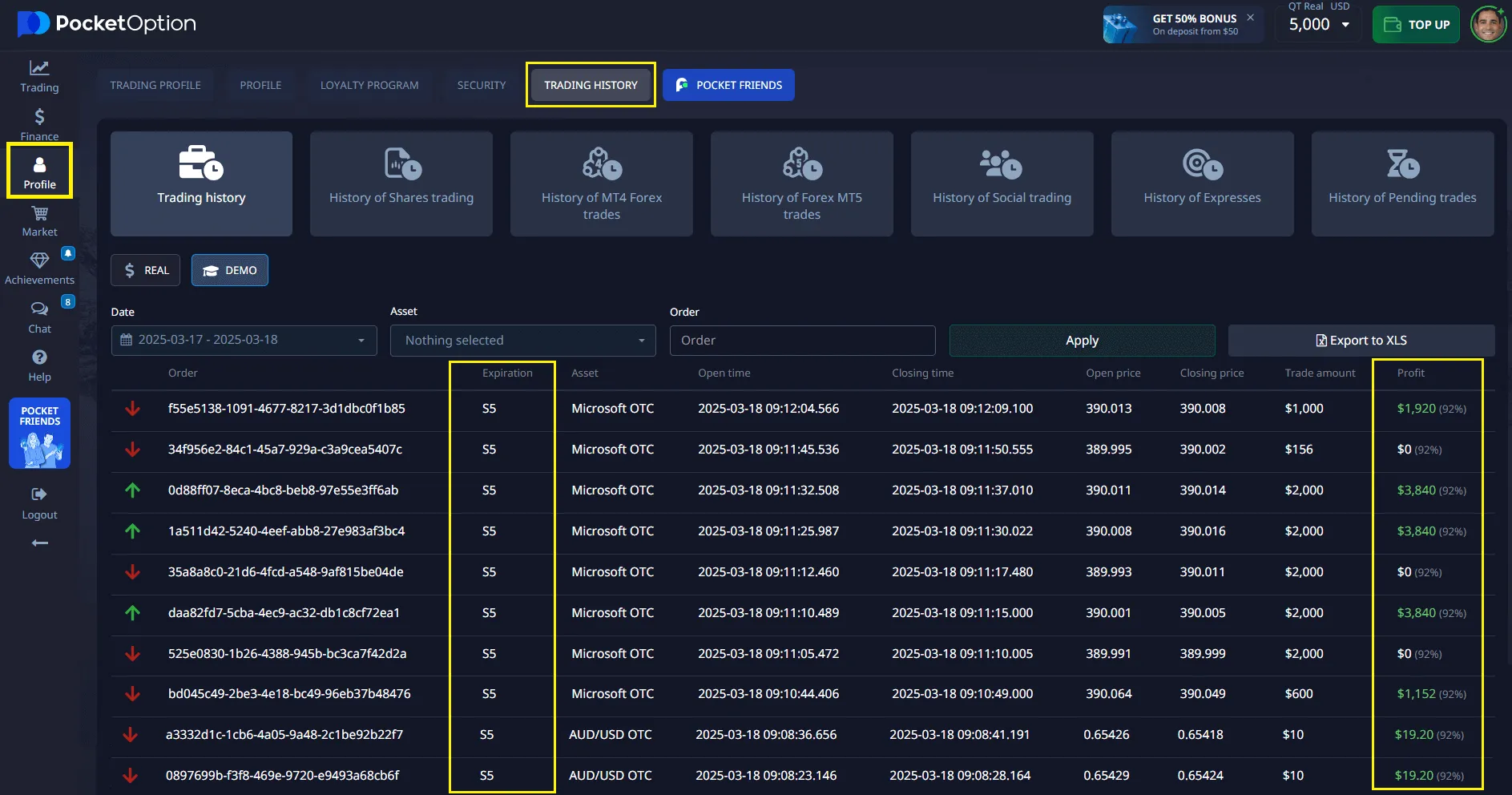
4️. Trade History
In your trading profile, you’ll find a log of all your trades from the session.
- Filter by date, asset, or status
- View detailed information for each trade
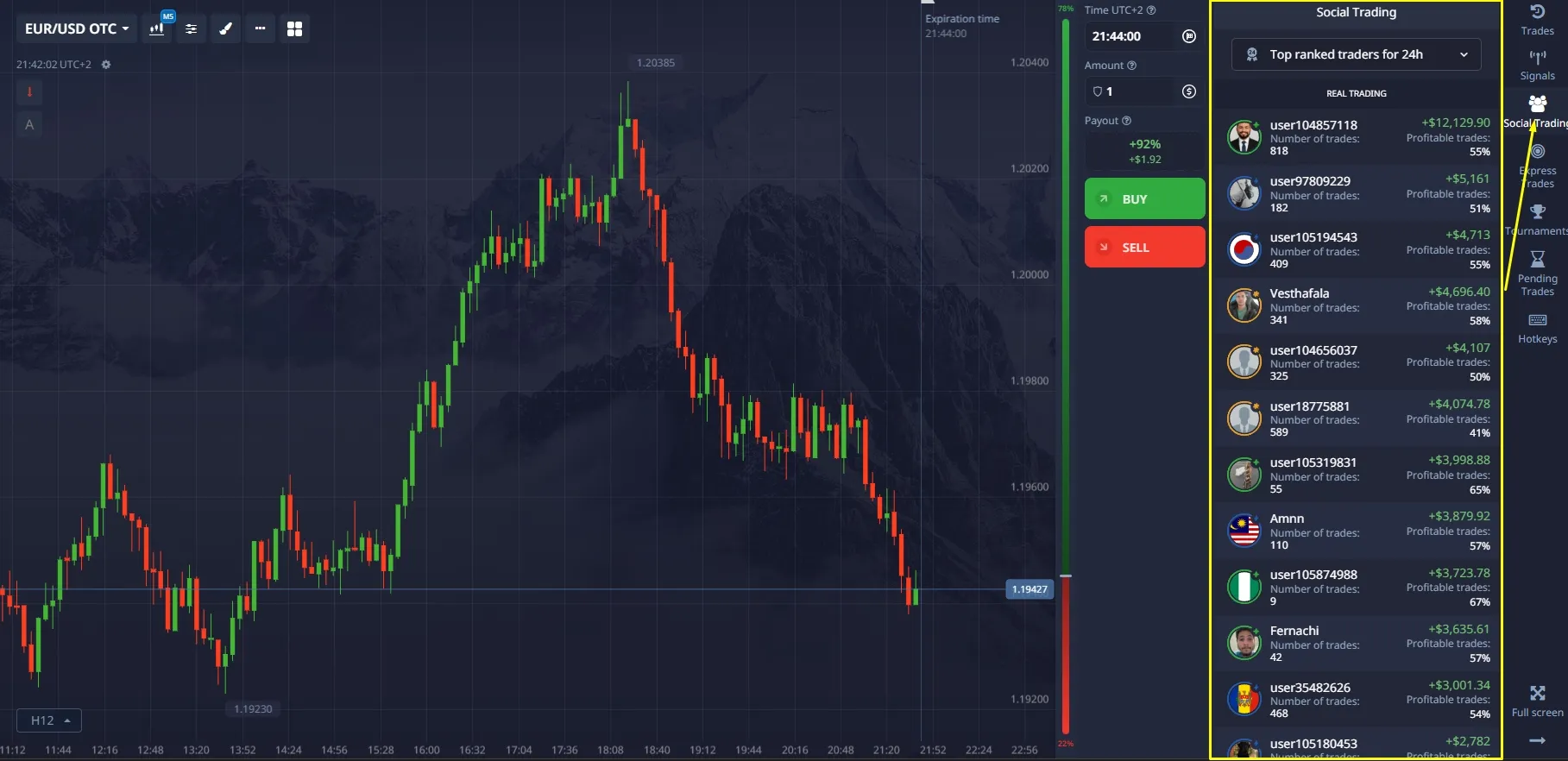
5️. Social Panel
Displays real-time trades of other traders along with their statistics.
✅ You can copy trades from top performers
Customizing the Interface to Fit Your Style
One of the key features of Pocket Option is its flexible interface.
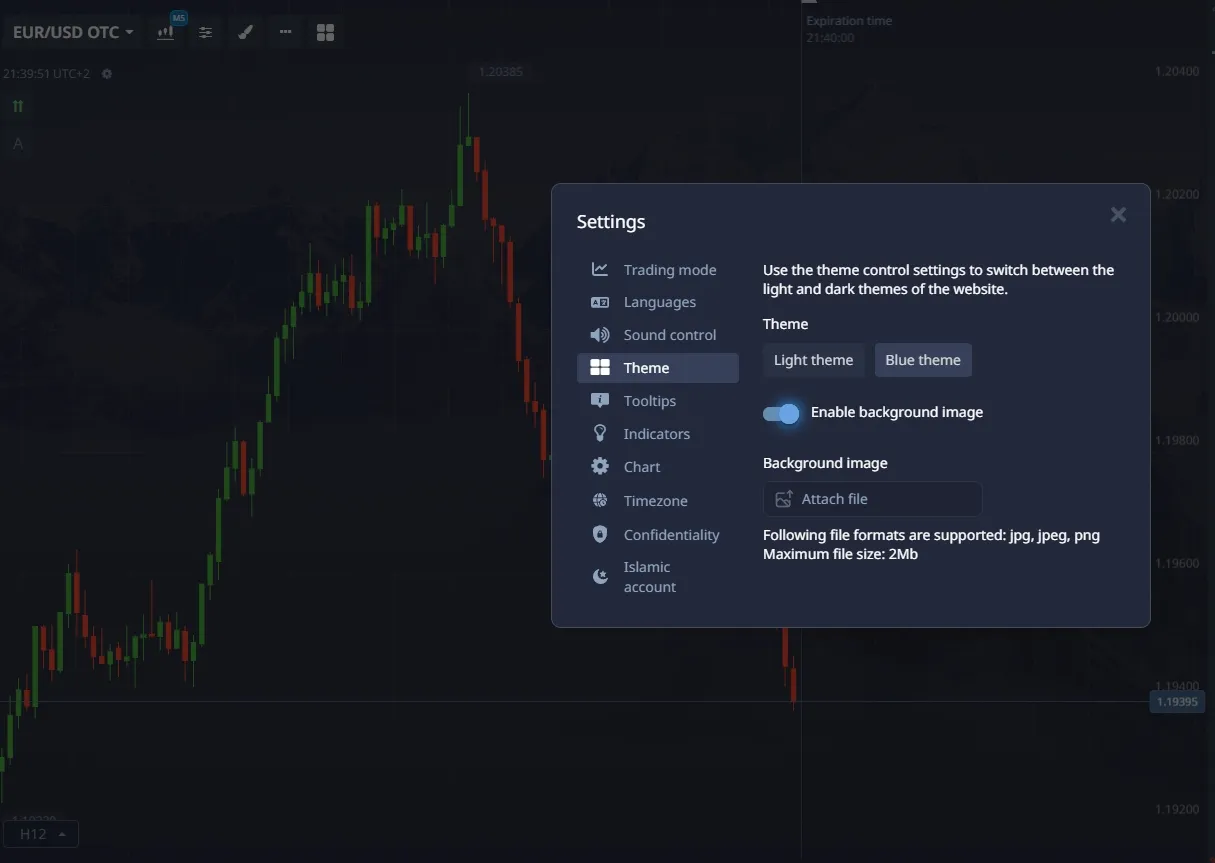
Theme
Choose between light or dark mode in the settings to ensure comfortable trading under any lighting conditions.
Panels
Drag and pin interface panels wherever it’s most convenient for you.
You can fully hide or show additional windows as needed.
Colors and Fonts
Customize chart colors, candlesticks, and levels to match your personal style.
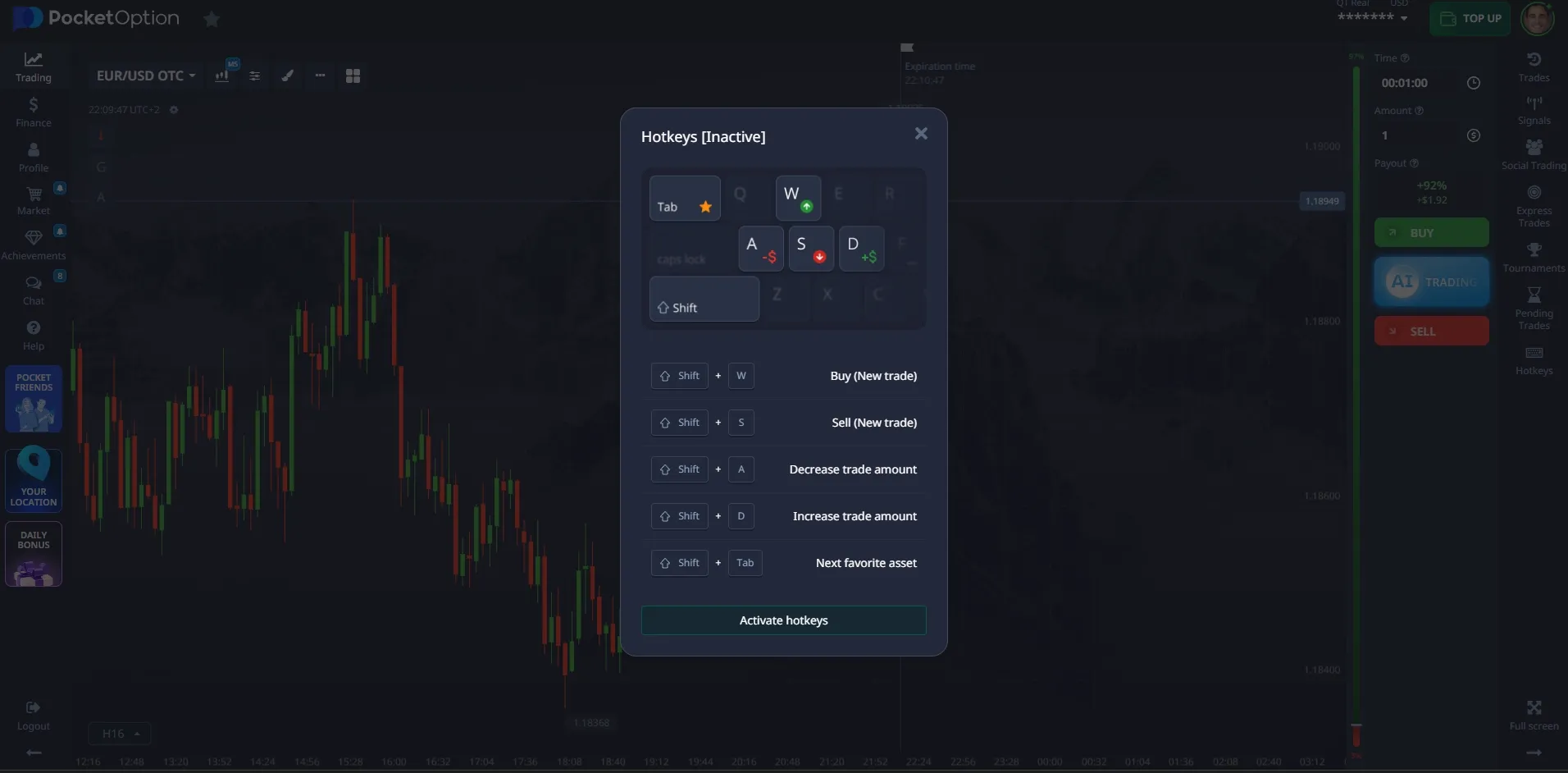
Hotkeys
Enable shortcuts for quick actions like opening an order, closing a position, or switching between charts:
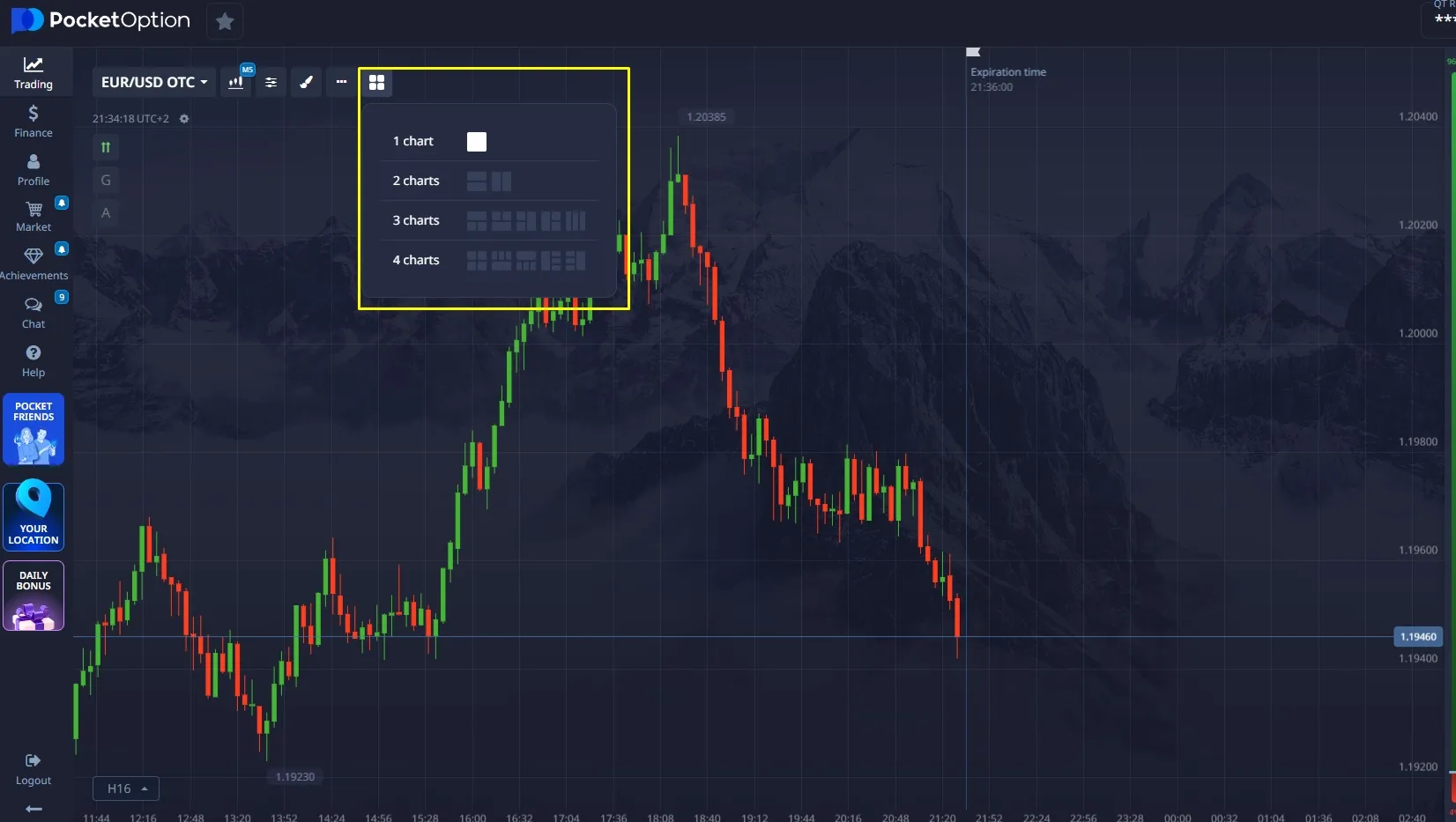
Multi-Chart Mode and Its Advantages
Pocket Option supports multi-window mode with up to 6 charts on a single screen.
This feature is especially useful for traders who monitor multiple markets at once.
Layout options include:
- 2x2
- 3x2
- Vertical or horizontal arrangements
You can customize each chart individually — choose different indicators, timeframes, and assets for every window.
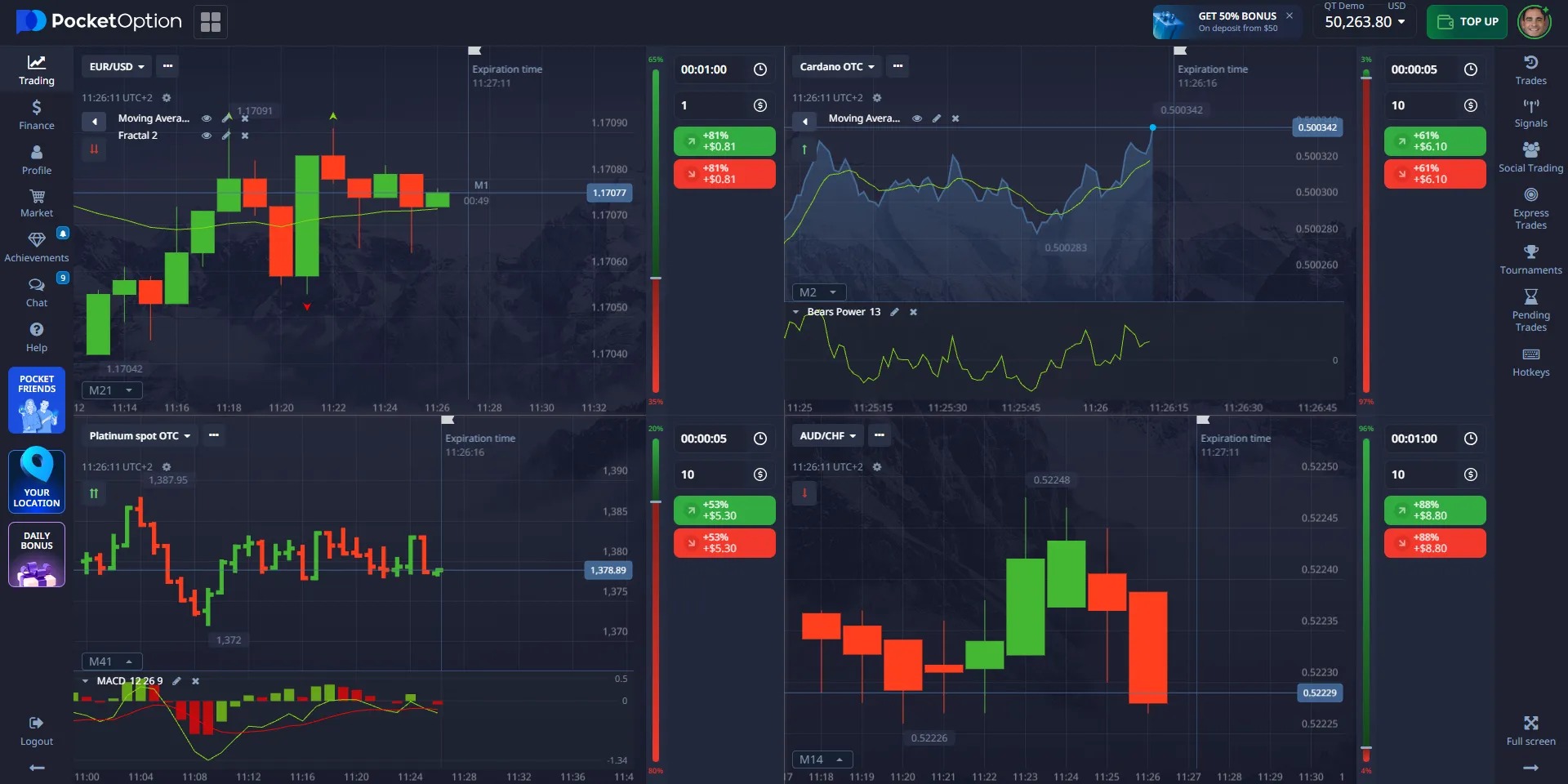
Chart Types and Timeframes
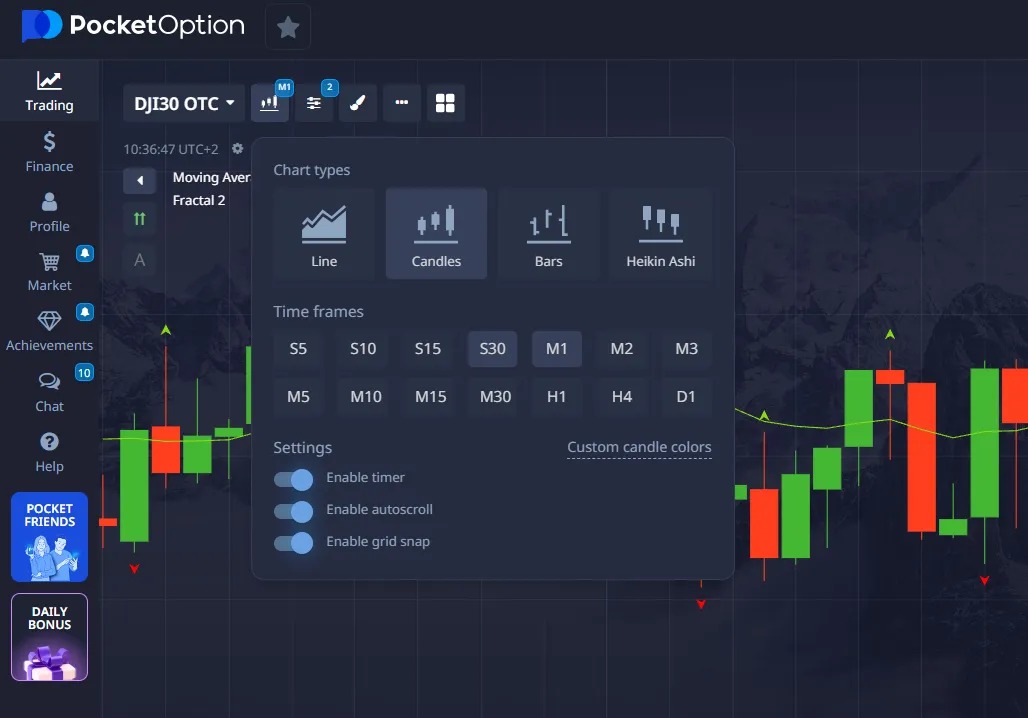
Pocket Option offers 4 chart types:
- Candlesticks (Japanese)
- Bars
- Line
- Heikin Ashi
Timeframes:
Using different timeframes allows you to monitor both short-term and long-term trends simultaneously.
Why Is It Important to Customize Your Workspace?
A well-organized trading workspace:
- Saves time
- Reduces the risk of errors
- Improves information clarity
- Enhances trading discipline
Use multi-chart mode, hotkeys, and customization features to stay one step ahead!
Advantages of the Pocket Option Trading App for PC
Key Advantages of the Pocket Option Web Platform
The desktop web application offers a full-featured web trading platform that runs directly in your browser.
There’s no need to download or install anything — simply open the website, log in to your account, and start trading.
✅ Instant Access
No need to wait for downloads or installations — just click the desktop shortcut and begin trading right away.
✅ Works on Any Computer
Whether you're using Windows, macOS, or even Linux — all you need is a modern browser (Chrome, Edge, Firefox, Safari).
✅ Automatic Updates
You never have to update the app manually. All new features and fixes are applied automatically.
✅ Saves Space and Resources
It doesn’t take up hard drive space or overload your system — unlike native apps.
✅ Access from Any Device
Start trading on your PC and continue on your phone — all data syncs in real time.
✅ Security
All transactions are encrypted, and access is only possible via the official website.
Advanced Analytical Tools
| Category | Quantity | Description |
| Technical Indicators | 30+ | RSI, MACD, Bollinger Bands, Moving Averages |
| Charting Tools | 9+ | Trend lines, support/resistance levels |
| Chart Types | 4 | Candlesticks, bars, lines, Heikin Ashi |
| Time Intervals | 15 | From 5 seconds to 1 month |
Unique Features of Pocket Option
Social Trading
• Copy trades from successful traders
• Trader leaderboard with detailed statistics
• Community discussions and trade analysis
Tournaments and Contests
• Daily tournaments with prize pools up to $50,000
• Various formats: speed, classic, VIP
Educational Resources
• Built-in learning materials
• Webinars from experts
• Market analysis and insights
Workspace Optimization: Maximum Efficiency
The Pocket Option app for PC allows you to fully customize your workspace according to your personal preferences. This is a major advantage over web versions, where customization options are limited. You can:
- Resize and reposition windows: Drag charts, toolbars, and other interface elements to create the most convenient layout. This enables you to monitor multiple assets or use various analysis tools at once.
- Save templates: Create and store custom chart templates with your favorite indicators and drawing tools. This saves time and allows for quick switching between different trading strategies.
- Use multiple monitors: If you have more than one monitor, the Pocket Option application lets you efficiently utilize them by placing different interface components across screens. This significantly enhances market visibility and supports in-depth analysis.
- Configure hotkeys: To speed up trading operations, you can set hotkeys for opening/closing trades, changing investment amounts, and more. This is especially useful for scalpers and day traders, where every second matters.
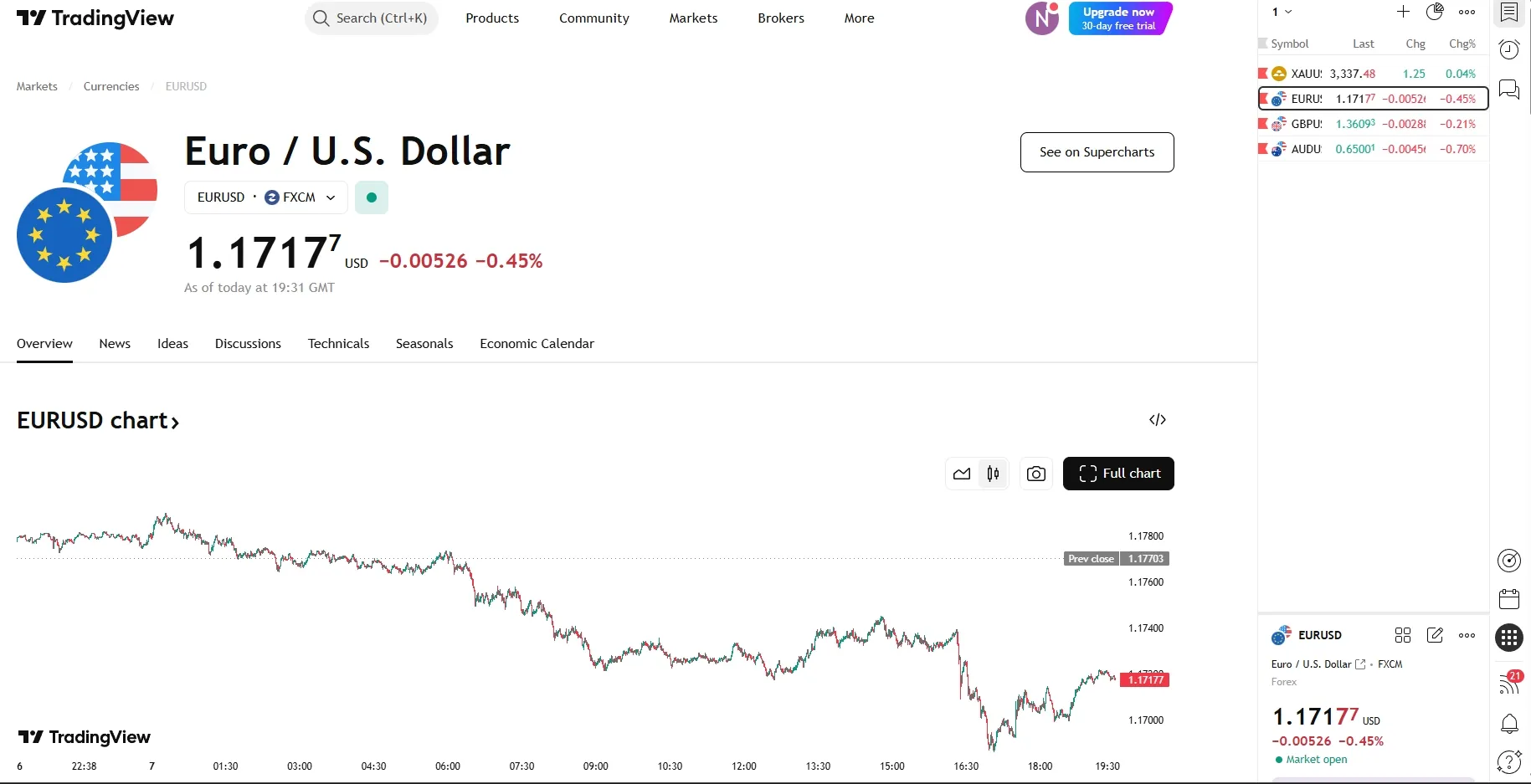
Pocket Option is a full-fledged trading platform offering everything you need: a wide range of assets, multi-chart capabilities, dozens of indicators, social trading, and fast trade execution.
However, some traders occasionally require more in-depth market analysis than what the standard terminal tools provide.
That’s where TradingView comes in—as a complementary tool to Pocket Option.
What Is TradingView and Why Isn’t It a Replacement for Pocket Option?
TradingView is an online service for charting and visual analysis.
It’s important to understand that TradingView is not a trading platform—you cannot open real-money trades there.
All your actual trading activities remain within Pocket Option.
Pocket Option is your trading platform:
- Deposits and withdrawals
- Real-money trades
- Bonuses and tournaments
- Social trading
TradingView is only a tool for extended analysis:
- Advanced charting
- Additional indicators
- Idea sharing from other traders
Why Do Pocket Option Traders Sometimes Use TradingView?
- To double-check their levels and chart markings on a larger screen with additional tools
- To discover new ideas and market perspectives in the community
- To test a hypothesis and return to Pocket Option to execute the trade
How to Use Both Tools Effectively?
Optimal workflow:
- In Pocket Option, open an asset and select a timeframe
- Open the same asset and timeframe in TradingView
- Do your markup and analyze additional signals
- Return to Pocket Option and execute your trade
TradingView is your analysis tool, Pocket Option is your primary terminal for live trading.
Pocket Option vs TradingView: Which One to Choose for PC?
| Aspect | Pocket Option | TradingView |
| Purpose | Trading platform | Analytical platform |
| Trading | ✅ Direct trading | ❌ Analysis only |
| Cost | Free | From $14.95/month |
| Indicators | 50+ built-in | 100+ (with paid subscription) |
| Assets | 100+ available for trading | Thousands available for analysis |
| Mobile Version | ✅ Full-featured | ✅ Limited |
| Social Features | ✅ Copy trades | ✅ Publish ideas |
When to Use Pocket Option:
- For direct quick trading and Forex
- For beginner traders (simple interface)
- For social trading and AI trading
- To participate in tournaments and contests
When to Use TradingView:
- For deep analysis across multiple markets
- To build complex strategies using Pine Script
- To publish trading ideas and market insights
- For professional technical analysis
TradingView download for PC – How to Install and Use It?
For traders who prefer working on a larger screen, TradingView offers a convenient option — installing it as an app on your PC.
It’s important to note that installing TradingView on your computer does not replace Pocket Option. It simply makes it easier to perform additional analysis before placing a trade.
All your real trades, bonuses, tournaments, and withdrawals remain strictly on Pocket Option.
Why Should You Install TradingView on PC?
- Easier to monitor charts on a larger screen
- Quick access via desktop shortcut
- Runs in a separate window without overloading your browser
- Allows you to keep both Pocket Option and TradingView open simultaneously
This setup is perfect for traders who like to prepare their analysis on TradingView and then return to Pocket Option to execute the trade.
How to Install TradingView on PC?
As of now, TradingView does not offer a “full native program” for PC. Instead, it provides a PWA (Progressive Web App) — a convenient web wrapper that looks and functions like a regular desktop app.
Installation steps:
- Go to the official website: tradingview.com
- Log in to your account or create one
- Open the site in Google Chrome or Microsoft Edge
- Click the “Install TradingView” button in the top-right corner of your browser
- Confirm the installation — a shortcut will appear on your desktop