How to Use Pocket Option for Beginners
It is no easy feat learning how to use a new platform for trading. It becomes even more difficult to do so when you are faced with a myriad of new charts, indicators, and asset types. This Pocket Option tutorial hopes to make this initial phase less confusing by taking one through each step in order of difficulty. The emphasis will be put on the demo account. All the concepts described here can be applied using money online without any investment of real funds. This will be the best way to learn how to use Pocket Option for beginners.

It is no easy feat learning how to use a new platform for trading. It becomes even more difficult to do so when you are faced with a myriad of new charts, indicators, and asset types. This Pocket Option tutorial hopes to make this initial phase less confusing by taking one through each step in order of difficulty.
The emphasis will be put on the demo account. All the concepts described here can be applied using money online without any investment of real funds. This will be the best way to learn how to use Pocket Option for beginners.
What Is Pocket Option and Who Is It For
Pocket Option is an online trading platform through which you can trade various types of financial products like currency pairs, stocks, cryptocurrencies, indices, and commodities. There are two types of trading available on Pocket Option platform: quick trading with fixed expiry times; and MT trading with open positions and manual take profit and stop loss.
This platform caters to independent traders. There are no advising services provided here. It is entirely up to the trader to make trading decisions. The reason that Pocket Option for beginners is easy to use is that the interface is pretty straightforward, there is a demo account that comes with a $50,000 virtual balance, and the minimum amount to open a live position is quite low.
How to Register on Pocket Option Step by Step
Visit the website of Pocket Option and click on “Sign Up”. Registration is done via email ID or a linked social profile (Google, Facebook).
The verification process needs to be completed. Verification of identity is a prerequisite for the withdrawal of money from your account. It is preferable to complete the verification process before your first withdrawal.
Login into the account and go to the dashboard. You can access the demo account immediately after registering an account. No deposit needed to practice on the demo account.
with one of the best trading platforms
Log In / RegisterUnderstanding the Trading Interface
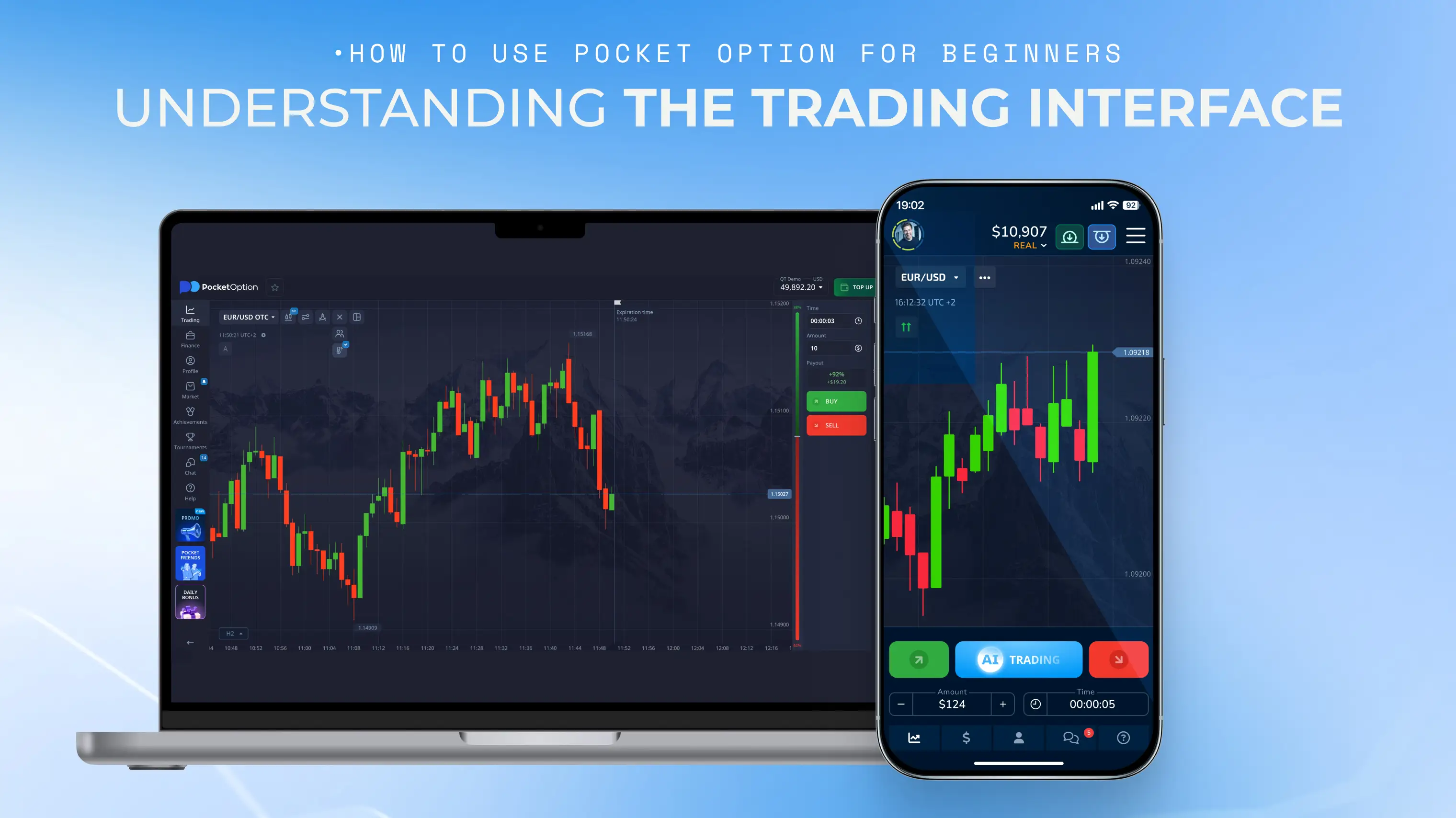
Desktop Platform Overview
The desktop platform interface comprises multiple segments, namely, the middle part contains the chart itself, the left-hand side contains the asset list and the right-hand side includes the trading controls (the amount, time, and direction). The indicators may be added from the chart’s toolbar. To understand how does Pocket Option work at the interface level, one should spend 10-15 minutes browsing this interface in demo mode.
Mobile App and PWA
Another version of the Pocket Option platform is offered as an Android mobile application and as a Progressive Web App (PWA) that can be accessed through the browser on your smartphone. The main difference from the desktop version is the design, which is adjusted to work on a smaller screen; however, the basic features remain the same.
Key Menu Sections
Charts: the central part of the analytical workspace. Technical indicators can be accessed, as well as chart types like candlestick, bar and line.
Assets: full listing of tradable assets grouped by asset class (forex, stocks, crypto, commodities, indices).
Analytics and signals: analysis tools that algorithmically detect trading setups. They are the beginning of an analysis process, but not trading advice.
Education: access to strategy tutorials, videos, and market commentary.
Demo vs Real Account: Why Start With Demo
Demo mode creates the exact market conditions using artificial money. Every instrument, every trading method, and every feature of the platform is present in demo mode. You can top up your balance at any moment.
It is not only a suggestion to begin with a demo but the right method of starting to use Pocket Option trading for beginners. It is the demo account where you make mistakes without paying for them and get used to the interface and trading style.
How to Practise on the $50,000 Demo Account
After signing in, ensure that “Demo” has been chosen from the account switcher (which is found at the top-right corner of the screen).
Select an instrument from the list. In the case of forex, the starting point can be EUR/USD. In the case of crypto, the starting point is BTC/USD.
Add one or two indicators to the chart (Moving Average for the trend and RSI for momentum).
Trade using a small percentage of the demo balance. Treat the virtual money as if it was real.
Document the transaction: instrument, direction, entry, exit, rationale, outcome.
Move to the live account when you become comfortable trading with the demo account.
with Pocket Option innovative approach
Try Demo AccountUnderstanding Assets You Can Trade
Currency pairs: major (EUR/USD, GBP/USD), minor (EUR/GBP, AUD/NZD) and exotic pairs. Foreign Exchange is the most liquid class of assets.
Stocks: contracts based on the price of one equity. No ownership of the underlying stock; the transaction is purely based on price movement.
Cryptocurrencies: BTC, ETH, SOL & more. More volatile than most conventional instruments. Trading happens round the clock.
Indices and commodities: S&P 500, DAX, Gold and Oil. They are macroeconomic-based securities traded on a day-trading and swing basis.
How to Open Your First Trade Step by Step
Pick the appropriate trading mode (Quick Trading, Forex, Shares Trading).
Pick your asset among the list of assets.
Pick the trade volume. Be conservative in this even at demo trading stage. The best way to develop a responsible approach to trade volumes is by beginning from the first trade.
Choose the trade period (in case of Quick Trading) or pick stop loss and take profit (in case of Forex).
Choose the direction: "Buy" if you predict that the price will rise, "Sell" if the price will fall.
Wait until the trade ends (Quick Trading) or control the trade process (Forex, Shares Trading). Record the outcome of your trade.
That's the basics of how to trade using Pocket Option for beginners. Select, size, direct, execute, record. This standard process forms the basis of all the strategies, indicators, and techniques to come.
in under 20 seconds
Get StartedUnderstanding Payout, Duration, and Expiry
Quick Trading provides the payout percentage before the trade can be entered. The payout percentage is the percentage profit gained in a winning trade. If the payout percentage is 80% for a $10 trade, then a win in the trade will earn the trader $18 ($10 original investment + $8 profit). Failure in the prediction results in loss of the original $10 invested.
The duration/expiry is the length of time after which the trade is closed. For Quick Trading, the time duration ranges between seconds to 24 hours. No expiry period exists for the Forex trade since it remains open until the trader closes it, or a stop/take profit is in action.
Depositing Funds: Minimum Amounts and Methods
There are different ways to deposit money in Pocket Option; these include deposits through bank cards, bank wire transfers, e-wallets and also cryptocurrency. The minimum amount of deposit is dependent on the method that one uses but in general, it has been kept low enough for beginners. Deposits are usually fast but will depend on the payment method used.
Withdrawing Funds: What to Expect
Withdrawals occur using the same methods used in depositing. Withdrawals can only happen once accounts have been verified. The processing time varies depending on the method of payments chosen. E-wallets take hours to process, while bank transfers take days in banks. In Pocket Option, normal withdrawals are available for free, although the payments provider will charge its own processing fee.
Basic Risk Management Rules for Beginners
Do not take more than 1 to 2 percent risk of your account in any trade.
Make sure you have a daily loss stop. As soon as you reach that, you should get out of trading for that day. Trading on emotions after losses is the fastest way to blow up your account.
Test any strategy you want to use by using the demo account.
Maintain a record of every trade you do. Without data, there is no feedback. Without feedback, there is no improvement.
Using Educational Tools: Strategy Library, Tutorials, and Signals
The Pocket Option platform includes in-built learning materials in the form of a library of strategies with explanations, video tutorials about platform usage and trading tips, as well as information about working with signals in order to find profitable opportunities. The library of pocket options strategy is useful, but every strategy needs to be tested on your demo account before being used in real trading.
Signals are produced by an algorithm and should be considered as a suggestion for analysis, not an order. A signal that matches your own technical analysis of charts is more important than those that do not match it.
Common Mistakes Beginners Make on Pocket Option
Going directly from the demo to the real account. There’s a reason why the demo account is there.
Too many risks in one trade. All it takes is just one mistake right at the beginning to ruin everything.
Not journaling your trades. Write down all of your trades and make sure to go back and look at them.
Following signals blindly without really knowing why they’re there.
Treating trading Pocket Option as a game and not as a skill to practice.
Moving from Demo to Real Trading Carefully
Transitioning from demo trading to actual option trading should be done when the following criteria are satisfied: first of all, there must be no less than 30 successful trades demonstrated by the journal and second, there should be positive expectancy (a higher winning percentage, overall).
Making the switch to the actual option trading, one should do his first trades with the minimum volume of transactions. This is because of the drastic change from the demo to real money, which triggers many feelings and emotions that were absent while trading on a demo account. The same trading strategy, the same trading rules and the same position size management must be followed.
Conclusion
This Pocket Option tutorial has covered all from registration to the first trade and from demo to real. The sequence was deliberately chosen: register, learn the platform, trade on demo, develop the routine, analyze your performance, and go live when the data suggests you do.
Pocket Option has everything for regular trading. The demo account provides a secure platform. Feedback should come from the journal. The only thing left is the discipline to follow the process without cutting any corners. Pocket Option for beginners may be easy to access but that does not mean that it is simple. Trading is a skill, and skills require practice and critique.
at Pocket Option
Register NowDisclaimer: None of the data presented in this article is intended to be taken as financial advice. The risks associated with trading include the potential for you to lose all of the money that you have deposited. The use of the demo account will involve virtual money, but the emotional impact of trading cannot be simulated through virtual means.
See more:Product Guides