Pocket Option Market 2.0: What's New?
Market 2.0 introduces Gold, a new currency for obtaining trading items on Pocket Option, alongside three confirmed ways to earn it and an updated interface with filters and Favorites. This guide covers what actually changed, how to get and use Gold, and what to check before using any Market item.

Market 2.0 brings a real change to how Pocket Option's Market section works. The headline addition is Gold, a currency that sits inside the section and can be used to obtain available trading items. Alongside that, the interface itself looks different, built around this new mechanic.
This article walks through what actually changed in Market 2.0: how Gold works, where it comes from, how the updated interface helps with browsing and saving items, and what to check before using anything obtained through it. None of the older mechanic carries over automatically. Market 2.0 replaces it with its own confirmed system.
Open a free demo account and get familiar with the platform, using virtual funds.
Try Demo AccountCurious how the updated interface actually looks once Gold and the new filters are in front of you? Reading about the layout only goes so far. Opening the platform and browsing Market directly shows how the pieces fit together far faster than any description can.
The pocket option tutorial is a solid place to get oriented on the platform first, if the basics of navigating Pocket Option still feel new.
Pocket Option Update: What Really Changed in Market 2.0
This pocket option update centers on three confirmed changes: Gold as a new way to obtain trading items, an updated way to actually earn that Gold, and a refreshed interface for browsing what is available. Nothing about the previous Market mechanic gets artificially exaggerated as different here. The comparison below sticks to what actually changed.
Area | Previous Version | Market 2.0 | What It Means for Users |
|---|---|---|---|
Getting Items | Tied to matching Gems or Gem combinations | Gold usable for available trading items | A more direct path to items without needing a specific Gem match |
Earning Currency | Gems earned through platform activity | Gold earned by exchanging Gems, selling unused inventory items, or platform activity | More than one route to build up Gold |
Browsing Items | Limited filtering | Filters by category and availability | Faster to find relevant, actually obtainable items |
Saved Items | No dedicated saving feature | Favorites for saved items | Items of interest stay easy to find later |
Reading this pocket option update as a full replacement of the old mechanic misses the point. It layers Gold and a better interface on top of the same underlying idea: trading items exist, and Market is where you get them. Anyone with a Pocket Option login account can see the updated section directly, and a pocket option update like this one tends to matter most once you actually open Market and look around.
Gold Is the Big Change
Previously, getting a specific trading item meant having the right Gem, or the right combination of Gems, to match exactly what that item required. Sometimes that Gem simply was not available yet, which meant waiting rather than acting. Gold changes that dynamic. Available items can now be obtained using Gold directly, including examples like Ultrade and Cashback, without needing a specific Gem to line up first. Not every single item in Market is necessarily available for Gold. That depends on what the current interface actually shows for each one, so checking the item itself remains the reliable step.
A Faster Way to Browse and Save Items
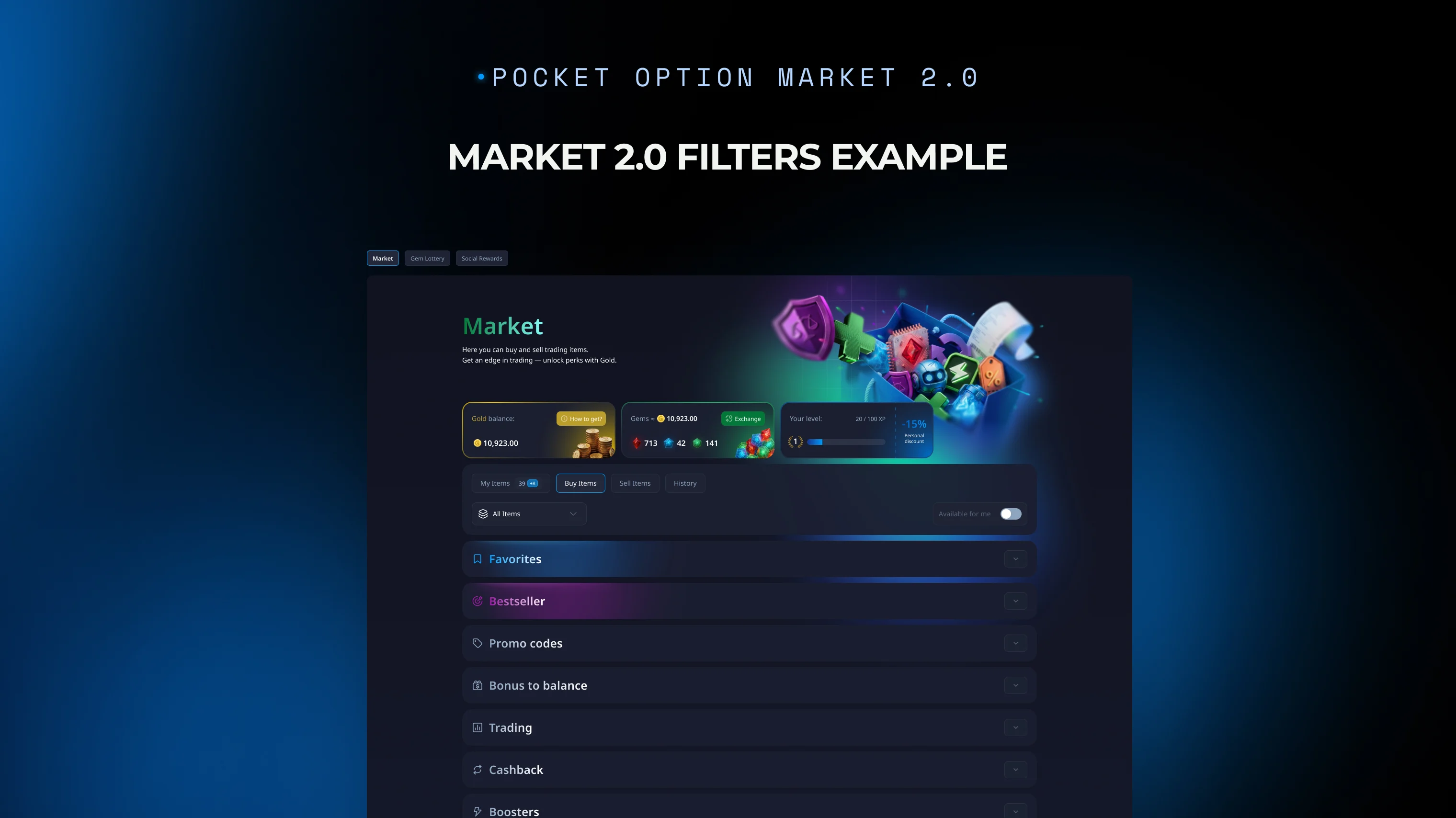
The updated design groups items so filtering by category and by availability actually narrows down what shows up, rather than scrolling through everything at once. Favorites adds a way to save specific items for later, useful when comparing a few options or coming back to Market after checking something else on the platform first.
Three Ways to Get Gold
Three confirmed paths lead to Gold. Exchanging Gems converts an existing balance into Gold directly. Selling unused inventory items turns something already sitting unused into Gold instead. Regular activity and trading on the platform contributes to Gold as well. Exact exchange rates, amounts, and any limits tied to each path show up in the current interface and the platform's Terms and Conditions, worth checking there directly rather than assumed fixed.
Choosing a Market Item With Gold
Once Gold is available, the process runs straightforward. Browse the items currently on offer, check what each one costs in Gold and any conditions attached, then select the one that fits whatever the Gold balance actually allows. Ultrade and Cashback are examples of the kind of item that can show up in this list, though the exact lineup depends on what the platform currently offers. Neither choosing nor using any specific item changes how a trade itself performs, and no combination of items shifts the underlying odds of any position. The item is a reward mechanic, not a trading edge, and treating it as one misreads what it actually does.
Finding Your Way Around Market 2.0
A quick walkthrough of the updated layout: categories group items by type, filters narrow that list further by category and availability, Favorites holds anything saved for later, and the current Gold balance shows alongside whatever is available to redeem. None of this requires leaving Market to check elsewhere. Everything relevant to a decision sits inside the section itself.
Before You Use a Market Item
Every item carries its own specifics. Before using one, checking its cost in Gold, any conditions attached, limitations, how long it stays valid, and whatever else the interface displays for that particular item avoids assuming terms from a different item carry over. Using a Market item does not, on its own, improve how a trade performs or guarantee any particular result.
Risk Disclaimer: Trading involves significant risk of capital loss. This article is for educational purposes only and does not constitute financial advice. Always conduct independent research and consider your risk tolerance before making any trading decisions.
See more:Platform updates