What's New in the Pocket Option AI Trader?
AI Trader is a new session-based trading mode on Pocket Option, launched August 9, 2026. This guide covers what changed compared to the previous AI Trading Mode, how to configure a session, and what happens once you press start.

Meet the New Pocket Option AI Trader
AI Trader is a new trading mode on Pocket Option, launched on August 9, 2026. It gives users a way to configure an AI-driven session in advance, setting the parameters first, then launching it as a single, defined run rather than an ongoing background process that keeps going in the background.
This new format sits alongside pocket option ai trading as a distinct mode, with its own session-based structure and its own setup screen. This article covers what actually changed compared to the earlier mode, how to set up a session step by step, and what happens once that session actually starts running.
Open a free demo account and get a feel for the platform, using virtual funds.
Try Demo AccountCurious how a configured session actually plays out once it launches? Reading about the setup only goes so far. Watching a session run from start to finish shows how the pieces connect far faster than any description can.
Open a demo trading account and get a feel for the platform before configuring your first session, with virtual funds and nothing real on the line.
What Changed in Pocket Option AI Trading
The pocket option ai trader update centers on how a session actually gets built, not on the underlying AI concept itself. Where the previous mode ran with fewer upfront choices, the new pocket option ai trader asks for specific parameters before anything starts.
Area | Previous AI Trading Mode | New AI Trader | What It Means for Users |
|---|---|---|---|
Setup | Ran with fewer upfront choices | Requires configuring asset, trades, amount, and strategy first | More control before a session even begins |
Session Structure | Ongoing background process | Defined session with a set number of trades | A clear start and end point instead of continuous running |
Trade Count | Not user-defined per session | 2 to 20 trades set in advance | Predictable scope for each run |
Starting Amount | Not configured as a discrete session setting | Set explicitly before launch | Capital allocation decided upfront |
Reading the pocket option ai trader as a totally different tool misses the point. It restructures the same underlying idea around a defined, configurable session instead of a continuous mode, and the pocket option tutorial covers the platform's basics first for anyone still getting oriented.
Setting Up an AI Trader Session
Configuring a session happens through the trading mode switcher, where AI Trader sits as its own selectable option alongside whatever other modes the platform already offers. Choosing it opens the setup screen, where a handful of specific parameters need to be set before the session can actually launch. Nothing runs until every one of those parameters has an actual value attached to it.
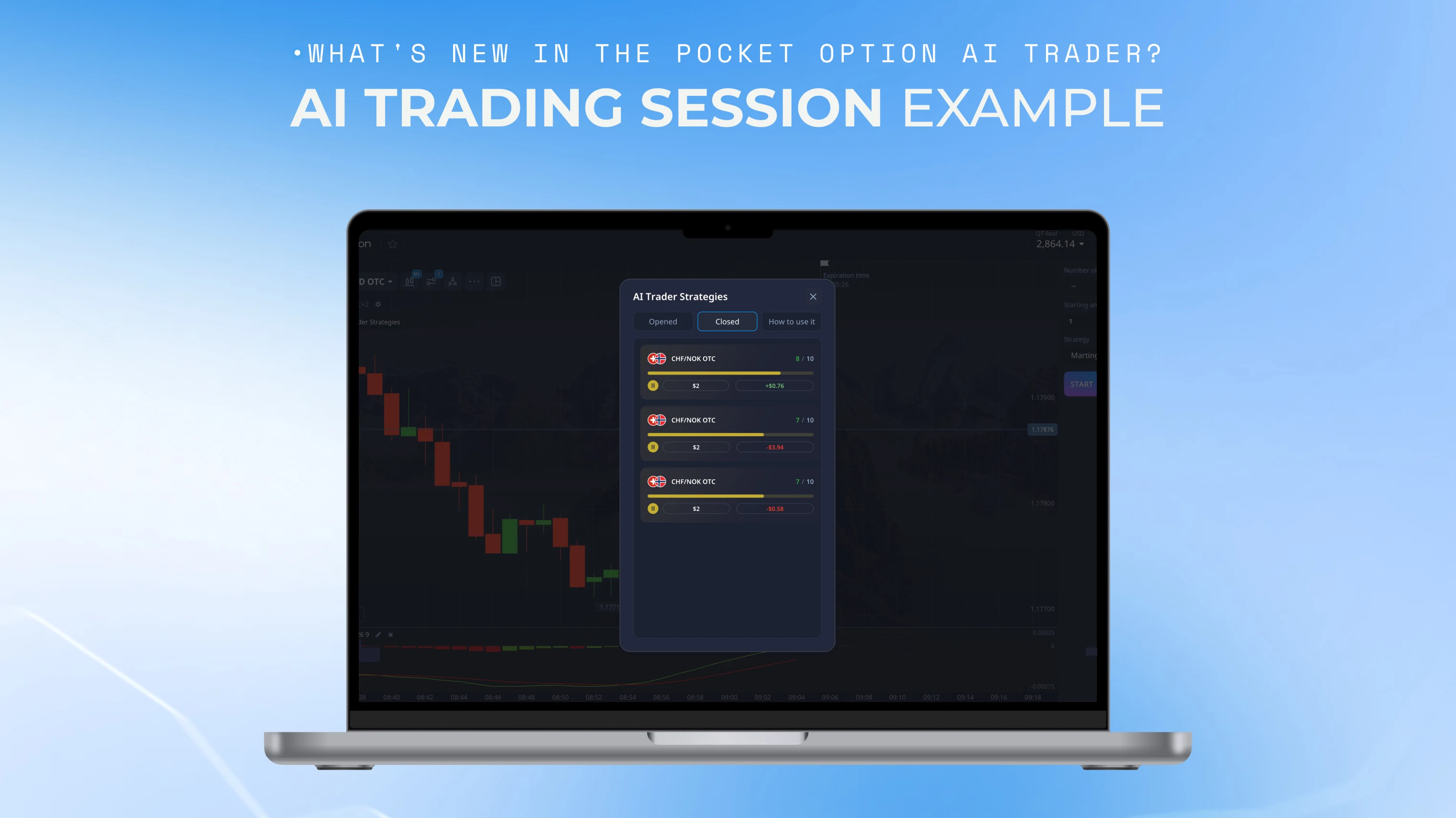
Choose an Asset and Number of Trades
The asset determines what the session actually trades, and that choice stays fixed for the entire run once the session launches. The number of trades sets how many positions the session opens before it ends on its own, anywhere from 2 up to 20 per session depending on what gets selected during setup.
Set the Starting Amount and Strategy
Starting amount sets the capital allocated to that specific session, separate from whatever else sits in the account balance. Strategy is selected alongside it, shaping how the session approaches its trades within the chosen parameters rather than leaving that choice open once things are already running. Both get locked in before the session actually starts, with no adjustment once it is underway.
What AI Trader Does After You Press Start
Once launched, AI Trader analyzes the market in real time and opens trades according to whatever was configured beforehand: the chosen asset, trade count, starting amount, and strategy. The session runs within those defined boundaries rather than adjusting them mid-run.
Before You Start an AI Trader Session
Double-checking the asset, number of trades, starting amount, and strategy before launching is worth doing every time, since a session runs exactly on what gets configured at the start and doesn't pause partway through for a second look. Automating the setup doesn't remove the underlying trading risk, it just changes how the session gets initiated, and every trade within that session still carries the same exposure a manually placed one would.
Risk Disclaimer: Trading involves significant risk of capital loss. This article is for educational purposes only and does not constitute financial advice. Always conduct independent research and consider your risk tolerance before making any trading decisions.
See more:Platform updates