
How to Set Stop Loss on Pocket Option: Protect Your Investments
Stop Loss en trading: aprende a usar esta herramienta clave para proteger tus inversiones y controlar pérdidas.

How to Set Stop-Loss on Pocket Option
A stop-loss is a risk management tool that automatically closes a trade when a predetermined loss level is reached. Using a stop-loss helps traders minimize losses and protect their capital from significant market fluctuations.
On the Pocket Option platform, a stop-loss can be set manually when opening a trade or adjusted during the trading process. It is crucial to determine the stop-loss level correctly so that it does not trigger prematurely but still protects the deposit from excessive losses.
Where Can You Set a Stop-Loss on Pocket Option?
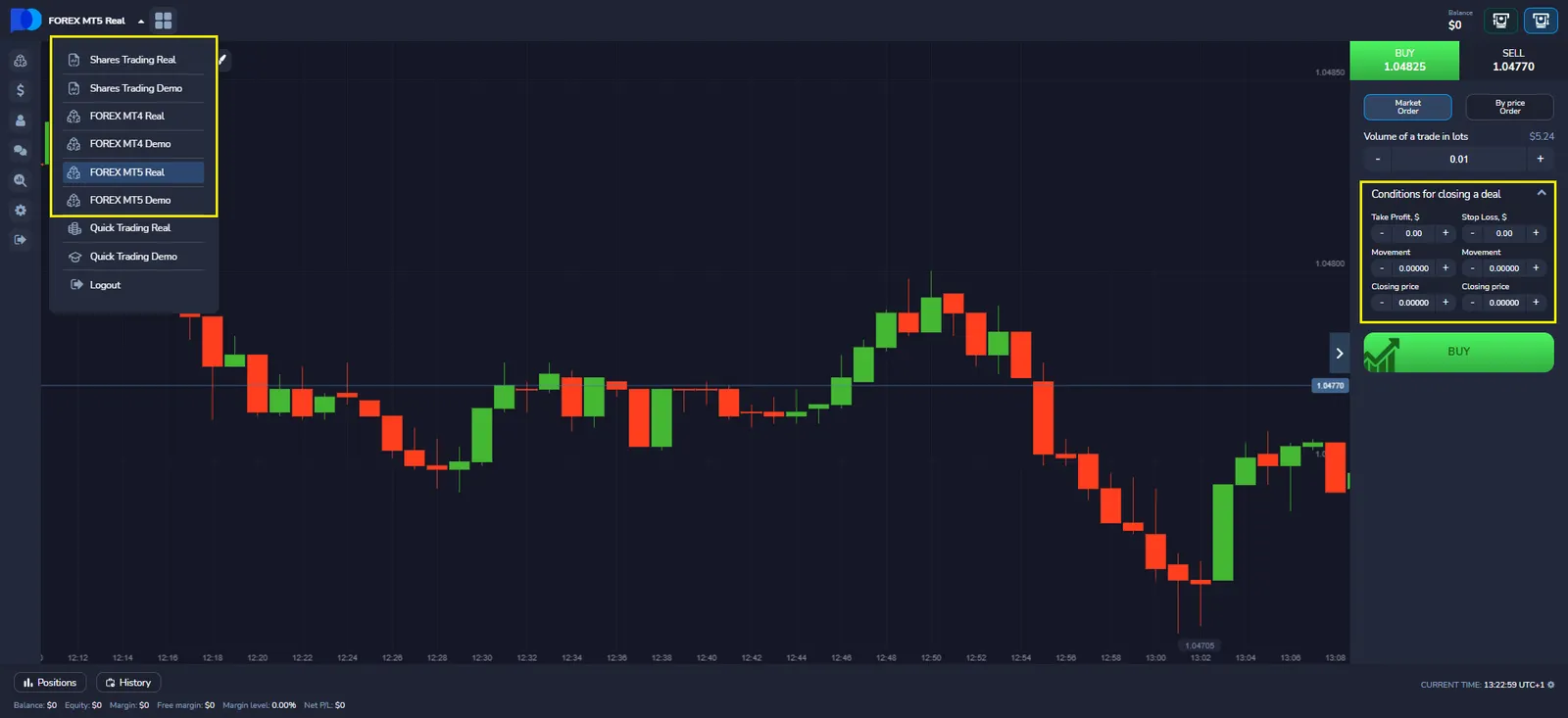
On the Pocket Option platform, the ability to set a stop loss is not available on all account types. This tool is only applicable on certain platforms.
Pocket Option Platforms with Stop-Loss Support
The stop-loss feature is available on the following platforms:
- MT4 Real
- MT4 Demo
- MT5 Real
- MT5 Demo
- Shares Trading Real
- Shares Trading Demo
On these platforms, traders can set stop-loss manually.
Pocket Option Platforms Without Stop-Loss
The stop-loss function is not supported on the following account types:
- Quick Trading Real
- Quick Trading Demo
These platforms are designed for fast-paced trading with fixed stakes and do not provide flexible risk management via stop-loss. In such cases, traders are advised to use alternative risk control methods, such as fixed stake sizing or setting session loss limits.
How to Set a Stop-Loss on Pocket Option: Step-by-Step Guide
The process of setting a stop-loss consists of several steps:
- Select an Asset – Open the trading platform and choose the financial instrument.
- Determine the Risk Level – Calculate an acceptable loss level based on your strategy.
- Open a Trade – Choose the trade direction (buy/sell).
- Set the Stop-Loss – Define the price level at which the trade will automatically close.
- Confirm the Settings – Ensure the parameters align with your strategy.
Key Stop-Loss Parameters
For effective use of stop-loss on Pocket Option, it is essential to consider the key parameters:
| Parameter | Description |
|---|---|
| Stop-Loss Level | The price at which the position closes automatically |
| Calculation Method | Set manually or automatically based on indicators |
| Risk Size | Defined as a percentage of the deposit or a fixed amount |
| Flexibility | The ability to adjust the stop-loss during trading |
A stop-loss should be set considering market volatility to avoid premature trade closure.
Methods of Setting Stop-Loss on Pocket Option
Manual Stop-Loss
- The trader sets the stop-loss level manually when opening a trade.
- It can be modified during trading.
- Suitable for experienced traders using technical analysis.
Automatic Stop-Loss
- Configured using indicators or a set percentage of the deposit.
- Adjusts dynamically based on market conditions.
- Convenient for beginners, reducing the likelihood of errors.
Trailing Stop
- Automatically moves the stop-loss level in the direction of profit as the price moves.
- Helps lock in a portion of the profit while minimizing potential losses.
- Useful in highly volatile markets.
Common Mistakes When Setting a Stop-Loss
Incorrect use of a stop-loss can lead to unnecessary losses. The most common mistakes include:
- Placing it too close – Causes premature triggering due to market fluctuations.
- Setting it too wide – Increases potential losses.
- Ignoring volatility – It is important to consider price movements when setting the level.
- Lack of adjustment – The stop-loss should be modified based on market conditions.
To avoid these mistakes, traders should analyze the market regularly and test different stop-loss placement methods.