
How to Transfer Money from One Pocket Option Account to Another: Simplified Steps
Pocket Option account transfers: learn how to move funds between multiple accounts efficiently.

How to Transfer Money from One Pocket Option Account to Another
Financial transactions within the Pocket Option platform have strict security and user protection restrictions. Many users wonder how to transfer money from one Pocket Option account to another, especially when managing funds across different strategies or trading setups. However, Pocket Option transfer funds between accounts is currently not supported for accounts under separate User IDs. However, traders can perform internal transfers between MT and Quick Trading balances within the same account. This article provides a detailed guide on how to make an internal transfer, what conditions to consider, and alternative deposit methods.
Can You Transfer Money Between Different Pocket Option Accounts?
Transferring funds between different Pocket Option accounts with different User IDs is not allowed. According to the Pocket Option multiple accounts policy, creating or operating more than one account may violate the platform's terms of service. The Pocket Option terms of service multiple accounts explicitly prohibit using multiple accounts to bypass platform rules or exploit bonuses. This restriction ensures compliance with security measures and prevents unauthorized transactions. Still, users can perform a Pocket Option internal transfer between accounts, meaning they can shift funds between MT5 and Quick Trading balances within the same verified account — a feature designed for internal risk and strategy management.
Pocket Option Transfer Options
| Transfer Type | Availability | Features |
|---|---|---|
| Between different accounts | ❌ Not available | Transfers between accounts with different User IDs are not possible |
| Between MT and Quick Trading balances | ✅ Available | Funds can be moved between balances within the same account |
| Depositing from external sources | ✅ Available | Bank cards, e-wallets, and cryptocurrencies can be used |
If you need to transfer funds but inter-account transfers are not an option, it is recommended to use bank transfers, e-wallets, or cryptocurrency payments.
How to Transfer Money Between MT and Quick Trading Balances
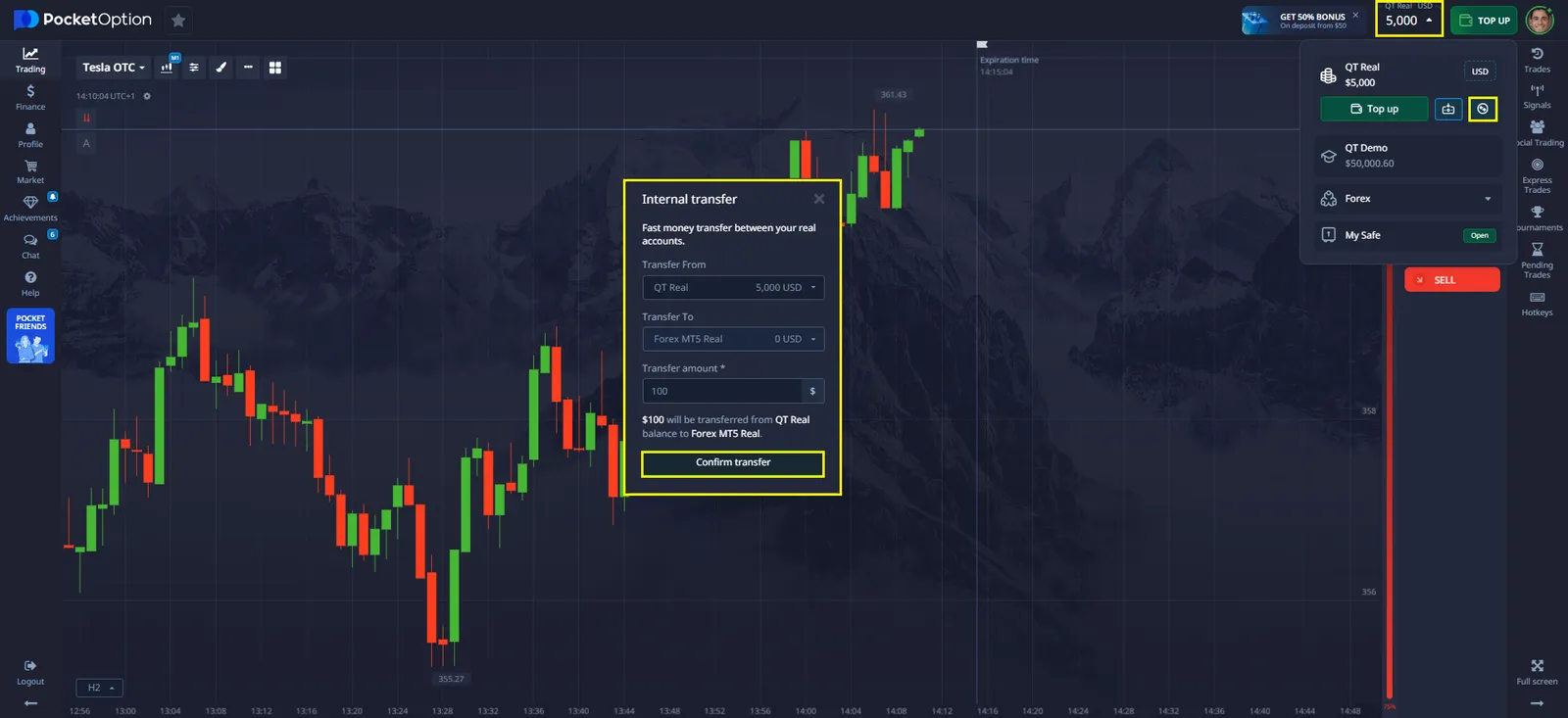
Internal transfers within a Pocket Option account allow users to efficiently manage their funds. This process takes only a few minutes and does not incur additional fees.
How to Perform an Internal Transfer
- Log in to your Pocket Option account.
- Go to the "Finance" section in the account dashboard.
- Select the "Internal Transfers" option or a similar feature.
- Choose the source balance (MT or Quick Trading).
- Select the target balance for the transfer.
- Enter the amount and confirm the transaction.
Once all steps are completed, funds will appear on the new balance within a few minutes.
Alternatively, you can use a simpler method—see the image below for guidance.
Things to Consider When Transferring Funds
- No fees are charged for internal transfers.
- Transfer availability may depend on account activity and verification status.
- If you encounter any issues, contact Pocket Option Support for assistance.
What Alternative Deposit Methods Can You Use?
If you need to fund another account, you can use one of the official deposit methods:
Available Pocket Option Deposit Methods
- Bank Cards (Visa, MasterCard)
- E-Wallets (Skrill, Neteller, Perfect Money)
- Cryptocurrency Payments (Bitcoin, Ethereum, USDT)
- International Bank Transfers
Each of these methods has different processing times and possible fees, which should be considered before making a deposit. For those looking to consolidate earnings, it's possible to Pocket Option withdraw to Binance or other cryptocurrency exchanges using USDT, BTC, or ETH, depending on the withdrawal method selected. And then I will top up the balance of the required account. To stay compliant and secure, always follow official procedures. If you're unsure how to transfer money from one Pocket Option account to another, or whether you can use multiple accounts, it's best to contact support or refer to the platform’s latest user agreement.