
StreamsEventsMedia
Streams
EventsHumorDataNewsSignals
GlossaryPlatform updates
LearningRegulation and safetyCalculatorsTradingMarkets
Trading StrategiesBonuses and promotionsTrading platformsReviews
Risk warning

Investing in financial products involves risks. Past performance does not guarantee future returns, and values may fluctuate due to market conditions and changes in underlying assets. Any forecasts or illustrations are for reference only and are not guarantees. This website does not constitute an invitation or recommendation to invest. Before investing, seek advice from financial, legal, and tax professionals, and assess whether the product suits your goals, risk tolerance, and circumstances. This website does not provide service to residents of the EEA countries, USA, Israel, UK, Philippines, Japan and Brazil.

Risk disclosure

All materials and services provided on this site are subject to copyright and belong to “Infinite Trade LLC”. Any use of materials of this website must be approved by an official representative of “Infinite Trade LLC”, and contain a link to the original resource. Any third-party companies of “Online broker” or “Online trading” type, do not have the right to use materials of this website as well as any distorted writing of “Infinite Trade LLC”. In case of violation, they will be prosecuted in accordance with legislation of intellectual property protection.

Infinite Trade LLC does not provide service to residents of the EEA countries, USA, Israel, UK and Japan.

Infinite Trade LLC is registered at Republic Of Costa Rica, San Jose- San Jose Mata Redonda, Neighborhood Las Vegas, Blue Building Diagonal To La Salle High School with the registration number 4062001303240.
All brokerage activity on this website provided by Infinite Trade LLC.

News
  • Events
  • Humor
  • Data
  • News
  • Signals
Interesting
  • Trading Strategies
  • Bonuses and promotions
  • Trading platforms
  • Reviews
Knowledge
  • Learning
  • Regulation and safety
  • Calculators
  • Trading
  • Markets
Categories
  • Glossary
  • Platform updates
Copyright © 2026 Pocket Option. All rights reserved.
Terms and ConditionsPrivacy policy
How to Change Email on Pocket Option?

How to Change Email on Pocket Option?

Changing your email on Pocket Option is essential for account security. This guide explains how to update it correctly and avoid access issues.

BearishEdited
February 18, 2025
Pocket Option

Written by Pocket Option

February 18, 2025

Update Your Pocket Option Email Now

How to Change Email on Pocket Option

If you need to update your email address on Pocket Option, follow these steps to ensure a smooth and secure process.

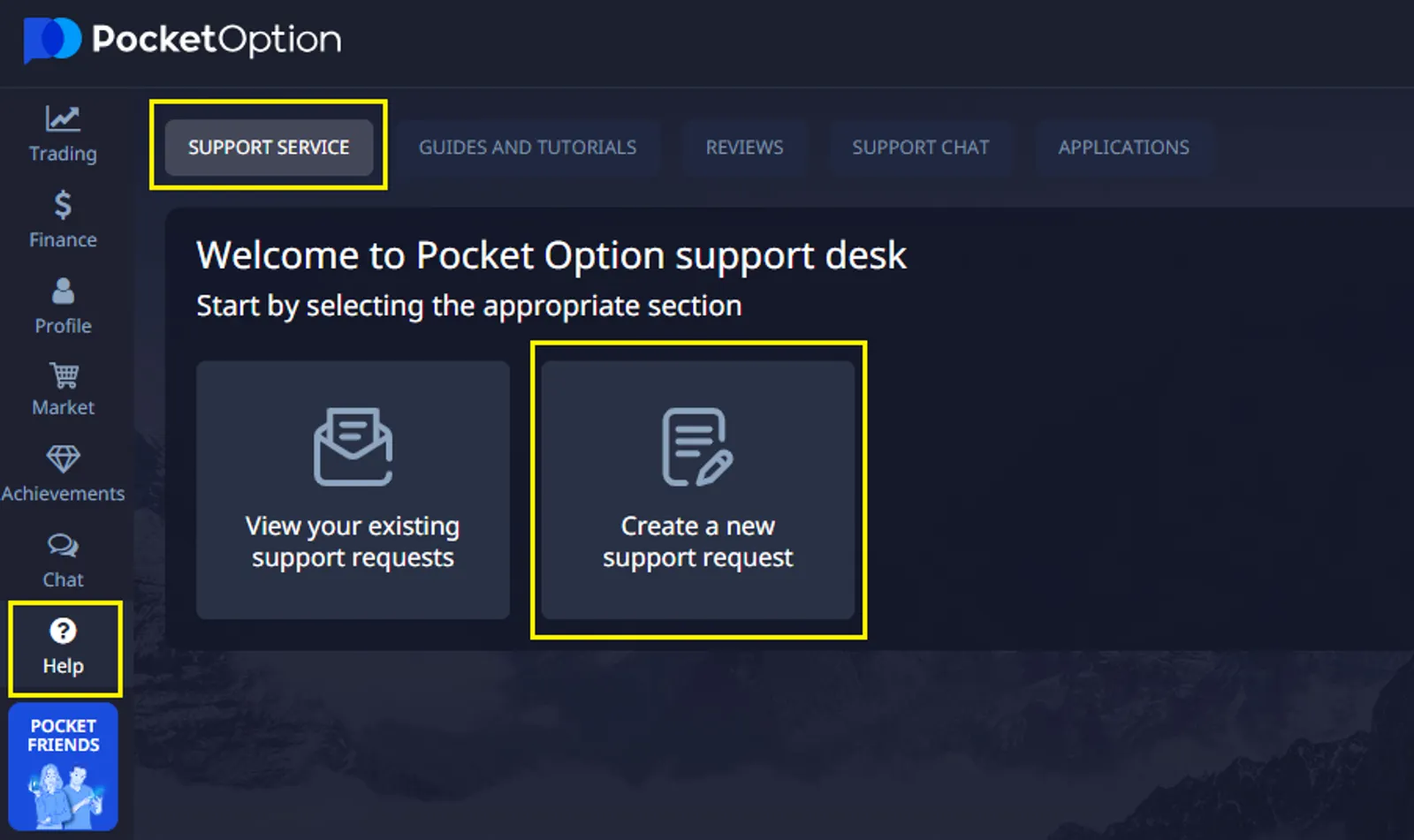
Step 1: Submit a Request to Support

Pocket Option does not allow users to change their email address directly through the platform. Instead, you must send a request to customer support. You can do this in one of two ways:

  • By sending an email from your new email address to support@pocketoption.com.
  • Using a support request on the Pocket Option platform.
img

Step 2: Provide Required Information

In your request, include the following message:

"I want to change the email address for my account 123456789/CURRENT EMAIL to NEW EMAIL."

Replace 123456789 with your actual account number and input your current and new email addresses.

Step 3: Attach a Verification Photo

To confirm your identity, attach a selfie in which you hold:

  1. Your identification document (passport, driver's license, or other valid ID).
  2. A piece of paper containing:
    1. The current date
    2. The website name "TRADE VERIFY"
    3. Your signature

Important Photo Requirements:

  • Your hands and fingers must be fully visible, holding both the paper and ID.
  • The photo must be high resolution, well-lit, and ensure that the text on your ID is easily readable.

Step 4: Wait for Confirmation

Once you send the request, the Pocket Option support team will review your submission and contact you with further instructions or confirmation of the email change. If you need additional help, don’t hesitate to reach out to Pocket Option’s support team.

Troubleshooting Email Change Issues

If you encounter problems while trying to change your email on Pocket Option, try these troubleshooting steps:

  • Clear your browser cache and cookies
  • Try using a different browser or device
  • Check your internet connection stability
  • Ensure your current email is still accessible
  • Contact Pocket Option support for assistance
Change e-mail on Pocket Option

See more:howplatformInterestingTrading platforms

Comments 0

    Content